FACTORY
4.0
🏭 Smart Factory Guide — WinFusion 2025
Smart Factory Kya Hai? —
CNC Manufacturing Mein WinFusion Ka Practical Role! 🏭
CAD/CAM Workflow | Tool Library | Machine Simulation | Post Processor | Information Flow
Smart Factory = Information Chain Reliable Hona:
CAD ⭐
→
CAM
→
Sim ⭐
→
Post ⭐⭐
→
Trial
→
Production ✅
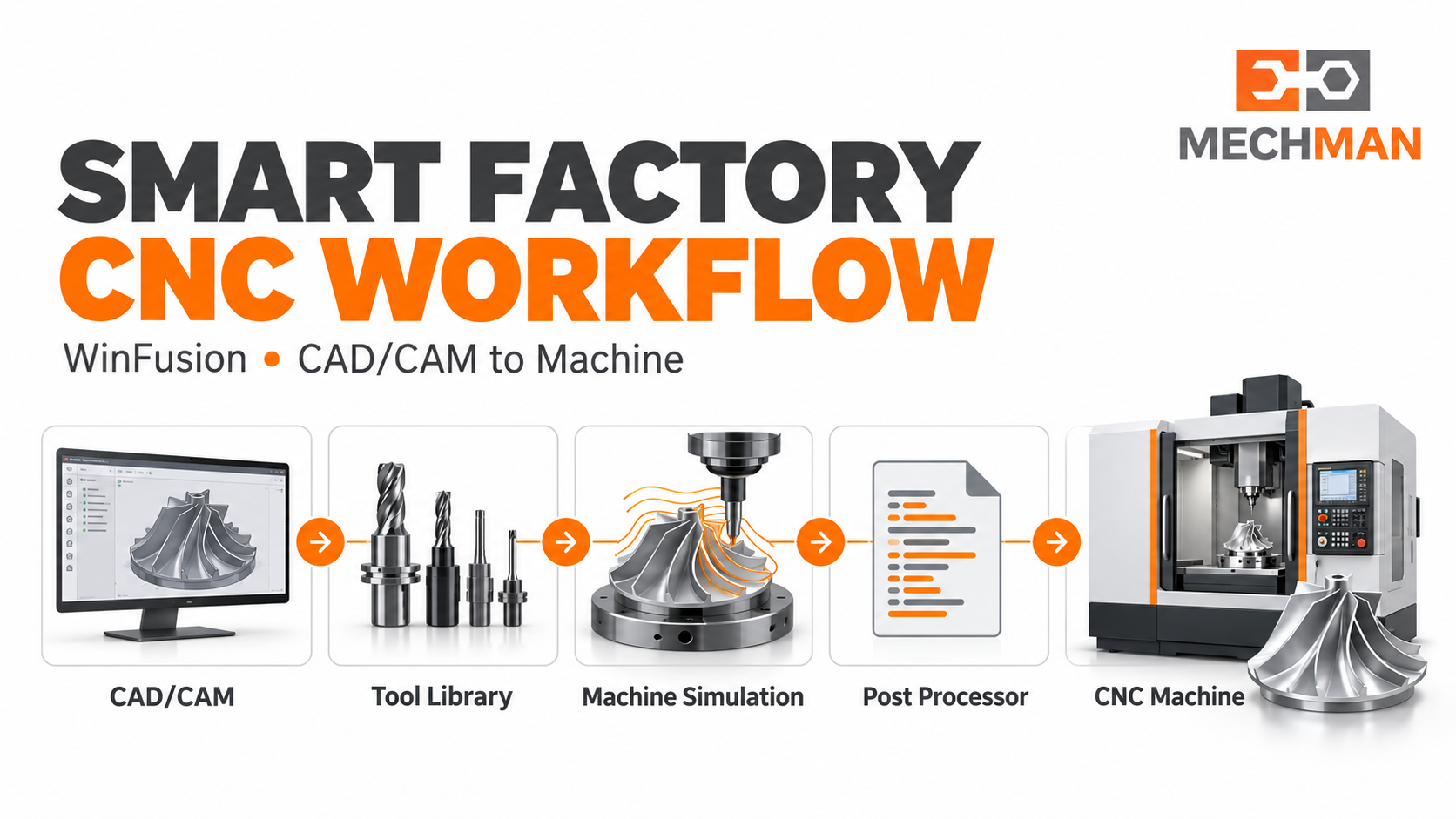
Smart Factory = sirf advanced CNC machine kharidna nahi! Design se machining tak information sahi transfer honi chahiye. CAD model, CAM, tool data, simulation, post processor, NC code — agar is chain mein koi mismatch ho, to expensive machine bhi idle reh sakti hai!
Nayi 5-axis machine install ho gayi — operator ready hai — component bhi aa gaya — phir bhi production start nahi? Kyunki correct post processor, machine setup ya verified NC program ready nahi! Yahin Smart Factory ka practical meaning samajh aata hai! WinFusion ka strongest connection Smart Factory ke CNC programming se production tak reliable implementation ke angle se hai!
“Smart Factory ko zero errors promise ke roop mein nahi — better planning, verification aur continuous improvement ke process ke roop mein dekhna chahiye!” ✅
WinFusion position: Smart Factory ke CNC programming aur implementation workflow ka hissa. Factory-wide IoT ya real-time monitoring alag systems maang sakte hain — clearly verify karein! ✅
🏭 Digital Manufacturing vs Smart Factory — Kya Difference?
CNC workshop ke liye practical difference samjho — aur WinFusion kahan fit hota hai:
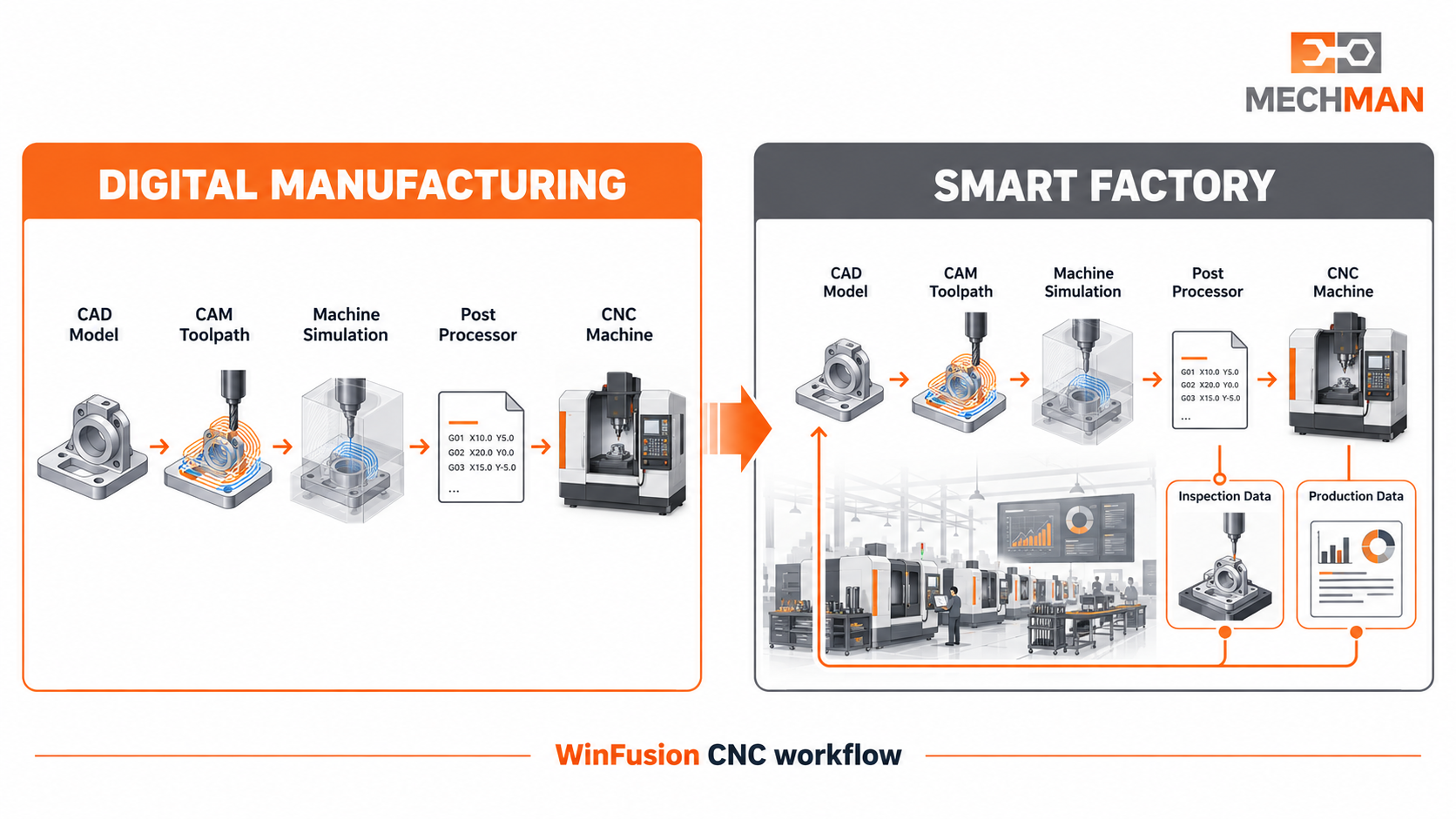
Digital manufacturing = digital tools se plan + program + verify karna. Smart Factory = machines + production systems + people + data connect karke factory decisions improve karna. CNC shop ke liye digital CAM workflow ek practical starting point hai!
- CAD/CAM data digital form mein ⭐
- Simulation se verify karo
- Post processor se NC generate
- Programming aur verification focus
Smart Factory (Broader): ⭐⭐
- Machines, systems, people connected
- Production data live ⭐
- Machine monitoring integration
- Factory-level decision making
Pehle programming aur verification reliable banao → phir machine monitoring, production data aur factory integration add karo! ✅
⚙️ Smart CNC Workflow — 6 Connected Steps!
1
CAD Model & Machining Requirement Clear Karo ⭐
Component 3D model, material, tolerance, surface finish aur delivery requirement samajhna zaroori hai. Blade, impeller aur complex aerospace parts mein geometry ke saath machine travel, tool reach aur fixture access bhi consider karo!
Wrong model revision → perfect toolpath bhi wrong part bana sakta hai! Latest revision first step hai! ⭐
2
CAM Mein Repeatable Process Banao ⭐
Stock, setup, WCS, tools aur machining strategies define karo. Documented CAM process se programmer ko har new job par zero se decisions lene ki zaroorat kam hoti hai!
Common setup standards + tool libraries → multiple programmers consistent kaam karte hain! ⭐
3
Tool Library Ko Actual Shop-Floor Tools Se Match Karo ⭐⭐
❌ Library mismatch:
Holder clearance ignore → simulation misleading result deti hai!
→
✅ Correct match:
Cutter + holder + gauge + cutting length = accurate sim! ⭐⭐
4
Machine Simulation Se Movement Check Karo ⭐⭐
5-AXIS KEY
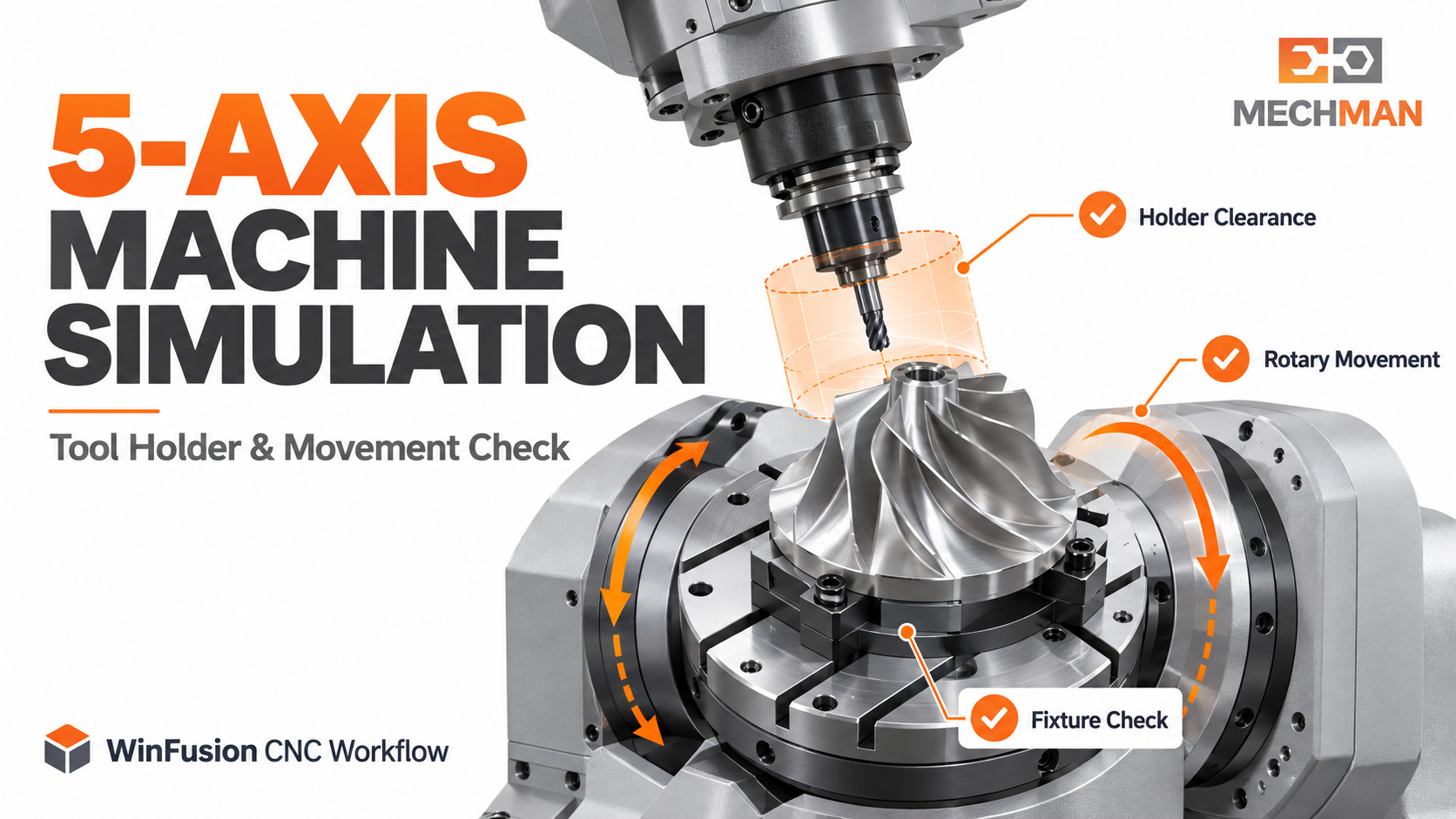
Machine simulation: Machine model + axis movement + tool holder + fixture + travel limits — spindle, table, rotary axes, fixture sab relevant checks karo. Simulation useful hai — final prove-out phir bhi zaroori hai!
5
Post Processor Ko Machine & Controller Ke Hisaab Se Verify Karo ⭐⭐
Same controller brand ke do machines ki kinematics, M-codes, tool-change sequence ya rotary limits alag ho sakti hain! Downloaded ya generic post = production-ready nahi!
Kinematics check ⭐
M-code sequence
Rotary limits ⭐⭐
Controller options
Machine trial ✅
6
First Article & Feedback Ko Process Mein Lao ✅
First component par machine trial, dimensional inspection aur operator feedback record karo. Safe retract, tool call, fixture clearance ya time mein issue → CAM setup aur post configuration mein capture karo!
Feedback loop = next job mein wahi problem repeat hone ki possibility kam hoti hai! Smart Factory ki real value! ⭐
📋 WinFusion Smart Factory Mein Kahan Fit Hota Hai?
CNC requirement ke against WinFusion ka practical focus:
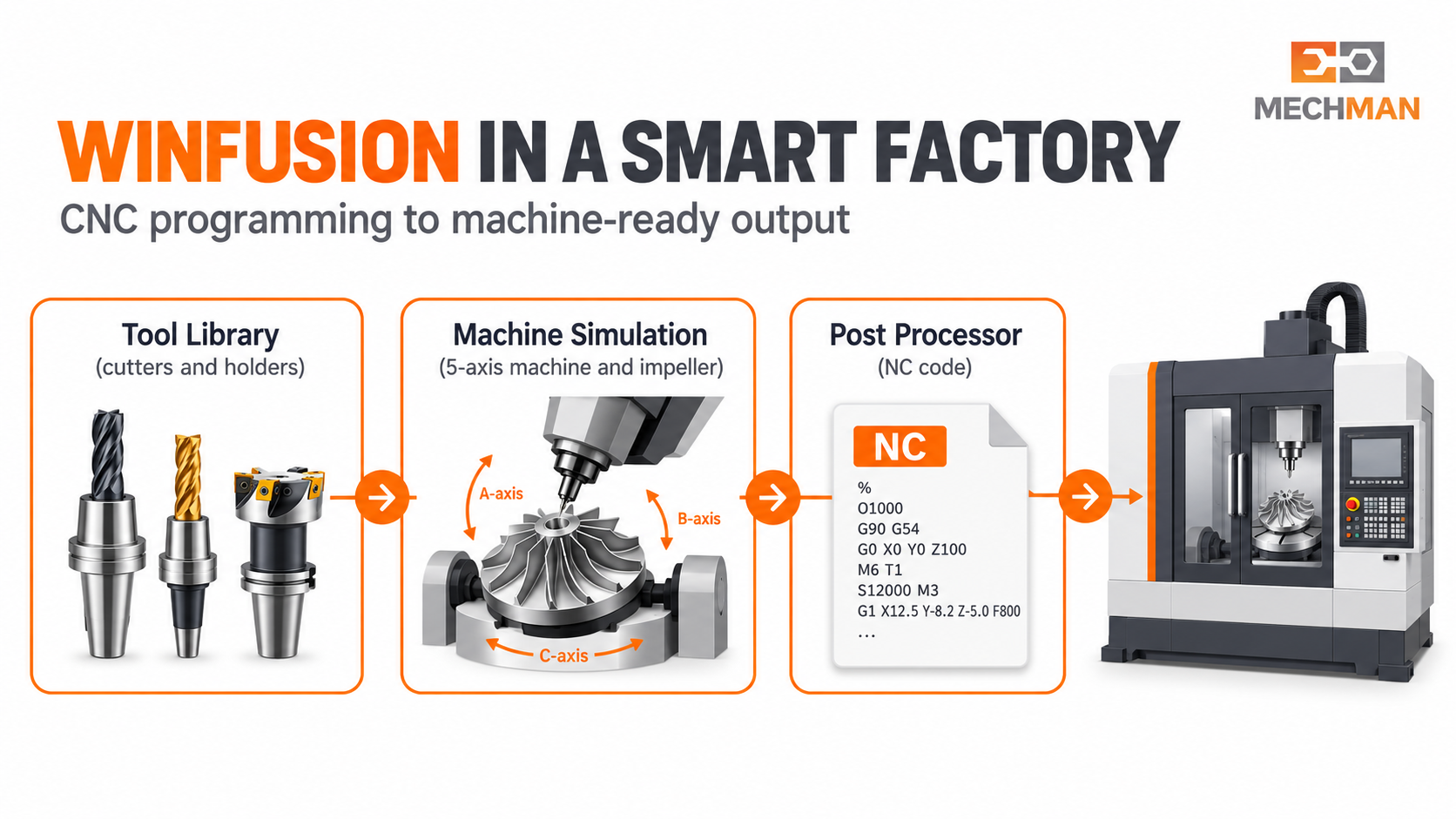
WinFusion: New machine → machine-specific programming + tool data + simulation + proven post + implementation support = reliable CNC-to-production workflow!
CNC Requirement
WinFusion Ka Practical Focus
New 3/4/5-axis ya turn-mill
Machine-specific programming workflow samajhna ⭐
CAM setup
Strategies, setup aur tool data configure karna ⭐
Machine simulation
Machine movement aur clearance verify karna ⭐⭐
Post processor
Controller ke liye NC output develop ya adapt karna ⭐⭐
Implementation
Trial + corrections + programmer training support ✅
❓ Nayi CNC Machine Lene Se Pehle — 8 Key Questions!
Machine purchase ke saath yeh answers pehle mil jaayein — installation ke baad delays manage karna aasaan hoga:
Q1
Machine ka exact model aur controller version kya hai? ⭐⭐
Q2
4-axis/5-axis configuration aur rotary travel limits kya hain? ⭐
Q3
Machine mein RTCP/TCP ya other controller options available hain? ⭐
Q4
CAM software ke liye suitable machine model aur post processor available hain? ⭐⭐
Q5
Post processor us exact machine configuration par test hua hai? ⭐⭐
Q6
Fixture, holder aur tool assemblies ki simulation kaise hogi? ⭐
Q7
Programmer aur operator ko implementation support kaun dega? ⭐
Q8
First machine trial aur NC corrections ka process kya hoga? ✅
Smart Factory — Connected CNC Workflow! 🏭
Smart Factory = CAD model, CAM program, tools, machine simulation, post processor aur shop-floor feedback ek consistent process mein kaam karte hain. WinFusion is chain ko reliable banata hai!
Information Flow
🔗 Connected!
WinFusion: CAD + CAM + Tool Library + Machine Simulation + Proven Post + Feedback Loop = Smart CNC Manufacturing! 🏭🚀
🏭
Smart Factory | CAM | Machine Simulation | Post Processor | 5-Axis
CNC machine aur programming requirement discuss karein!
Mechman Solutions — WinFusion
Autodesk Authorized Partner | Vadodara, Gujarat | Since 2015
www.mechmansolution.com
© 2025 Mechman Solutions | WinFusion — Smart Factory CNC Manufacturing Guide | Vadodara, Gujarat