
If you are into mechanical engineering or manufacturing, you might have seen the terms CAD, CAM, and CAE being used. But what do they actually mean, and how are they different from each other? No need to worry, we will help you out! We know that technical jargon can be quite intimidating, and in this blog, we are going to explain it to you in a simple and casual way so that you can easily understand what CAD vs CAM vs CAE are.
What is CAD?
CAD means Computer-Aided Design. In fact, it is software used by engineers and designers to create digital 2D drawings or 3D models of parts, assemblies, or even whole products.
Key Points about CAD:
- It is software used for product designing digitally
- Makes it easy to see the products before the manufacturing process
- Allows instant changes and helps in testing of shapes, sizes, and usage
- Well-known software: AutoCAD, SolidWorks, and CATIA
Example: Suppose you are working on a car engine project; CAD will enable you to build every single component of the engine virtually and also check the compatibility of the parts.
What is CAM?
CAM refers to Computer-Aided Manufacturing. In contrast with CAD, which is a design tool, CAM is a manufacturing tool. It works by taking the design files and transforming them into the language that machines like CNC can understand.
Key Points about CAM:
- It is aimed at the manufacturing processes
- Changes design information into instructions that machines can follow
- Optimizes tool paths and the machining time
- Well-known software: Mastercam, Fusion 360, Siemens NX
Example: What if the part of a car engine is generated in CAD, and then you want it to be real? The CAM application works like a bridge between the creation and the CNC unit, making it automated for the cutting of the metal block to provide the exact part.
What is CAE?
CAE is an acronym for Computer-Aided Engineering. It is a kind of software that helps engineers to forecast the implications of their design under real conditions by analyzing the designs that are made with CAD.
Key Points about CAE:
- It is solely for analysis and simulation.
- Besides testing for heat and hardiness, the system can test for stress, vibration, fluid flow, and so on.
- Let the developers know of the flaws in the designs even before they go to production.
- Well-known software: ANSYS, Abaqus, HyperWorks.
Example: With the use of CAE, one can even ascertain whether the engine part you designed will still function normally when subject to high temperature and pressure.
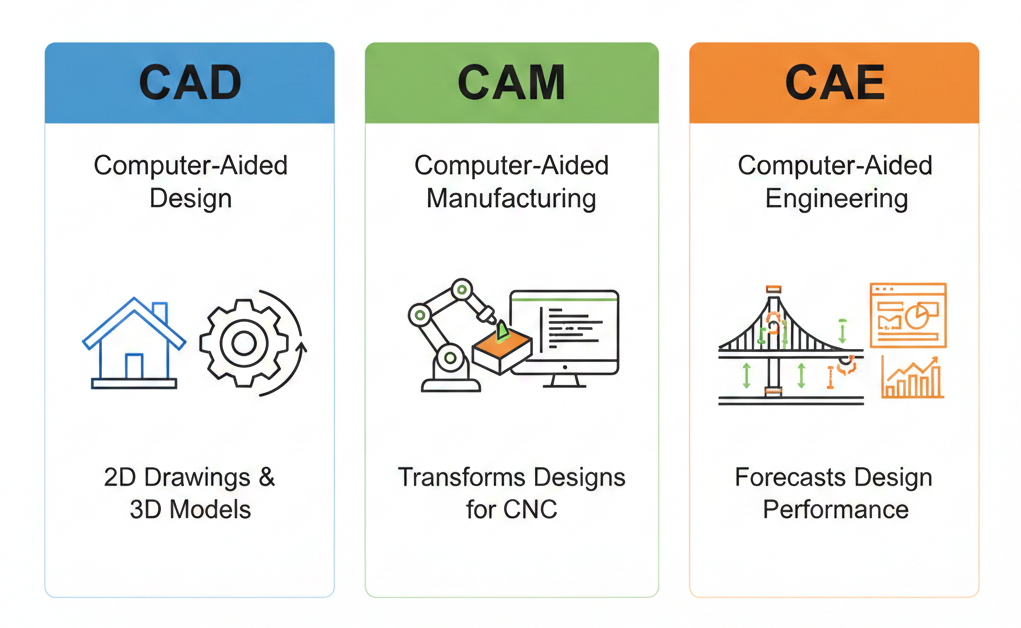
CAD vs CAM vs CAE: Simple Comparison
Below is a very simple CAD vs CAM vs CAE table that will quickly help you understand the differences:
| Feature | CAD | CAM | CAE |
|---|---|---|---|
| Full Form | Computer-Aided Design | Computer-Aided Manufacturing | Computer-Aided Engineering |
| Purpose | Designing & modeling | Manufacturing & production | Analyzing & testing |
| Focus | Geometry & shape | Machines & processes | Performance & safety |
| Output | 2D drawings / 3D models | CNC instructions | Analysis reports/simulation results |
| Popular Software | AutoCAD, SolidWorks | Mastercam, Fusion 360 | ANSYS, Abaqus |
How CAD, CAM, and CAE Work Together
Imagine a workflow in product development:
- CAD → You come up with a part or product idea.
- CAM → You create the part in every detail as illustrated.
- CAE → You check and test your invention for safety and performance through simulation.
These three, while working alone or together, are an assurance of better design quality, fewer mistakes, and quicker production.
Why Knowing the Difference is Important
Many beginners often get confused by CAD vs CAM vs CAE differences and mix them up, but getting to know their differences will have a great impact on your workflow. Deciding which tool to employ aids you in choosing the right software for your work, collaborating effectively with engineers, designers, and manufacturers, and saving time, money, and materials by not making mistakes.
Knowing these distinctions and using CAD, CAM, and CAE correctly will help in the processes of designing, analyzing, and manufacturing, which is how your projects become more efficient and error-free.
FAQs
1. Can one software do CAD, CAM, and CAE together?
Yes! There is software such as Siemens NX and Fusion 360 that integrates CAD, CAM, and CAE, thus facilitating the workflow.
2. Which one should I learn first?
It would be better to learn CAD first, as designing is the core. When you are proficient, you can switch to CAE for analysis and eventually to CAM for manufacturing.
3. Are CAD, CAM, and CAE used in all industries?
They are primarily used in the mechanical, automotive, aerospace, and manufacturing industries. However, their usage is growing in sectors like architecture, electronics, and product design as well.
Contact Us
📞 +91 99137 89065