5-Axis CNC Programming Guide
Mazak Variaxis J-600 ke liye
Best CAM Software Kaun Sa Hai?
Fusion 360 — Proven Post Processor, Machine Simulation aur Day-1 Implementation ke Saath
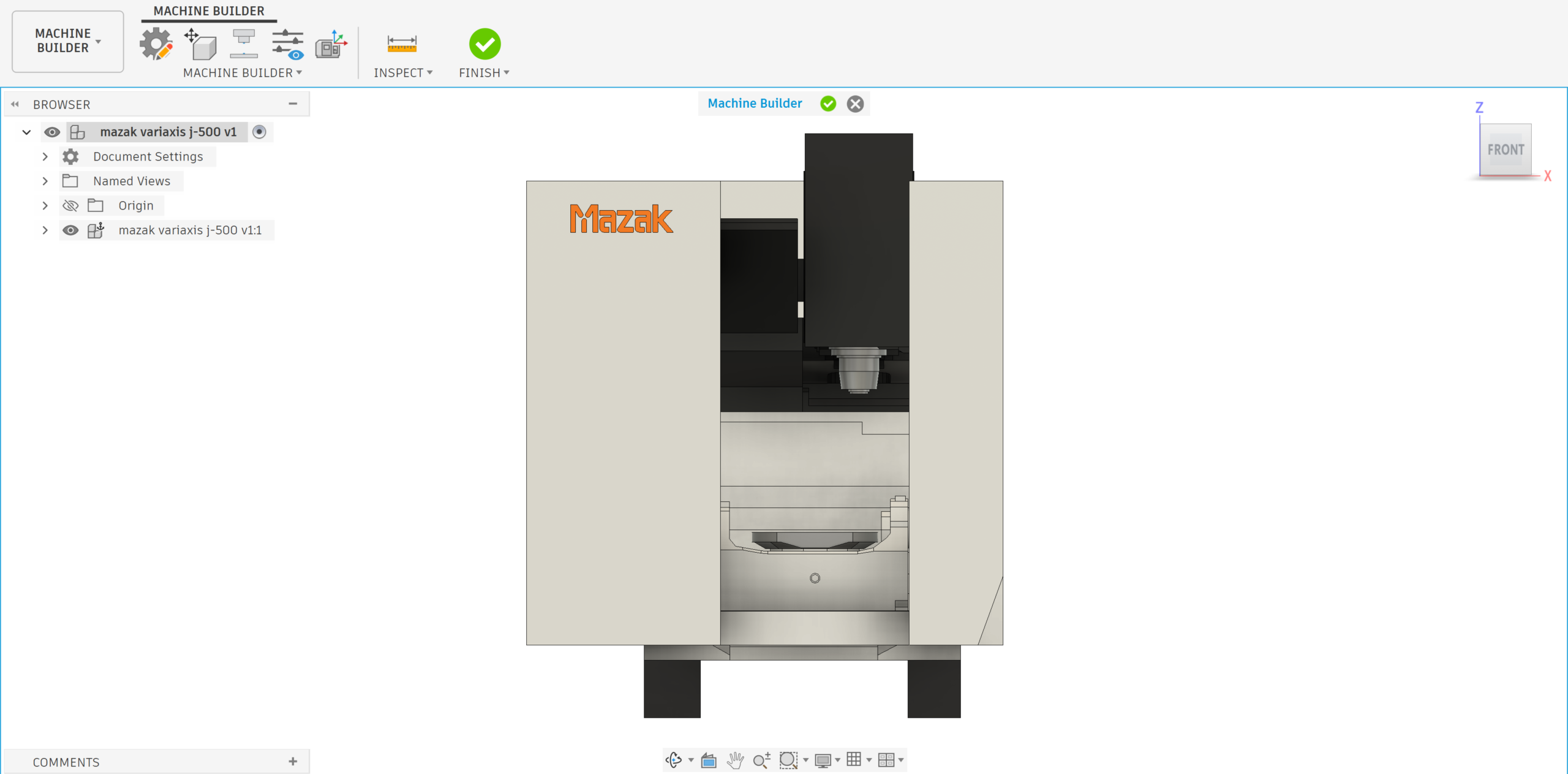
Full 3D machine simulation of the Mazak Variaxis in Fusion 360 helps detect and prevent programming crashes before hitting the shop floor
Mazak Variaxis J-600 — Fusion 360 Machine Builder mein fully loaded. B-axis tilt aur C-axis rotation ke saath complete machine simulation — machining se pehle screen pe sab kuch verify karo.
Tumne ₹2–4 crore ka Mazak Variaxis J-600 kharida. EMI chalu ho gayi. Lekin machine idle hai kyunki:
✗Post processor proven nahi hai
✗5-axis program crash ho raha hai
✗Programmer ne kabhi 5-axis nahi kiya
✗CAM vendor 1 week testing bol raha hai
✗Machine simulation nahi hai
✗G-code manually edit karna pad raha hai
Mechman Solutions yahi problem solve karta hai — Fusion 360 + Proven Mazak Post Processor + 1 Din mein Machine Productive.
Mazak Variaxis J-600 — Machine Specifications
⚙️ Axis Configuration
B-axis (Tilting Spindle) + C-axis (Rotary Table) — True 5-Axis
⚡ Spindle Speed
12,000 / 18,000 RPM — High Speed Machining Ready
🎯 B-Axis Range
-30° to +120° — Deep undercut features possible
🔄 C-Axis Range
360° Continuous Rotation — Full part wrap possible
🧠 CNC Controller
MAZATROL SmoothG / SmoothAi — Smooth Series
✅ Fusion 360 Support
Official Autodesk–Mazak Partnership — Tested Post Processor Available
⚠️ Important: Variaxis J-600 MAZATROL SmoothG/SmoothAi controller pe chalta hai. Tumhara CAM post processor specifically isi controller ke liye build hona chahiye — generic Fanuc ya EIA/ISO post yahan kaam nahi karega.
Fusion 360 Kyun? — 6 Solid Reasons
1
Official Autodesk–Mazak Partnership ✅
Autodesk aur Mazak ka official technology partnership hai. Yeh koi generic CAM-to-machine connection nahi — dono industry leaders ne mil ke Mazak machines ke liye purpose-built post processors aur machine simulation banaye hain.
✅Autodesk × Mazak Official Partner
✅Vetted machine simulation models
✅Post processor Autodesk maintain karta hai
✅Continuous updates — free mein
2
Proven SmoothG / SmoothAi Post Processor
Mazak Variaxis J-600 ka controller MAZATROL SmoothG ya SmoothAi hota hai. Mechman solution mein exactly isi ke liye validated post processor devlop kiya hai — jo Mechman ne already test karke rakha hua hai.
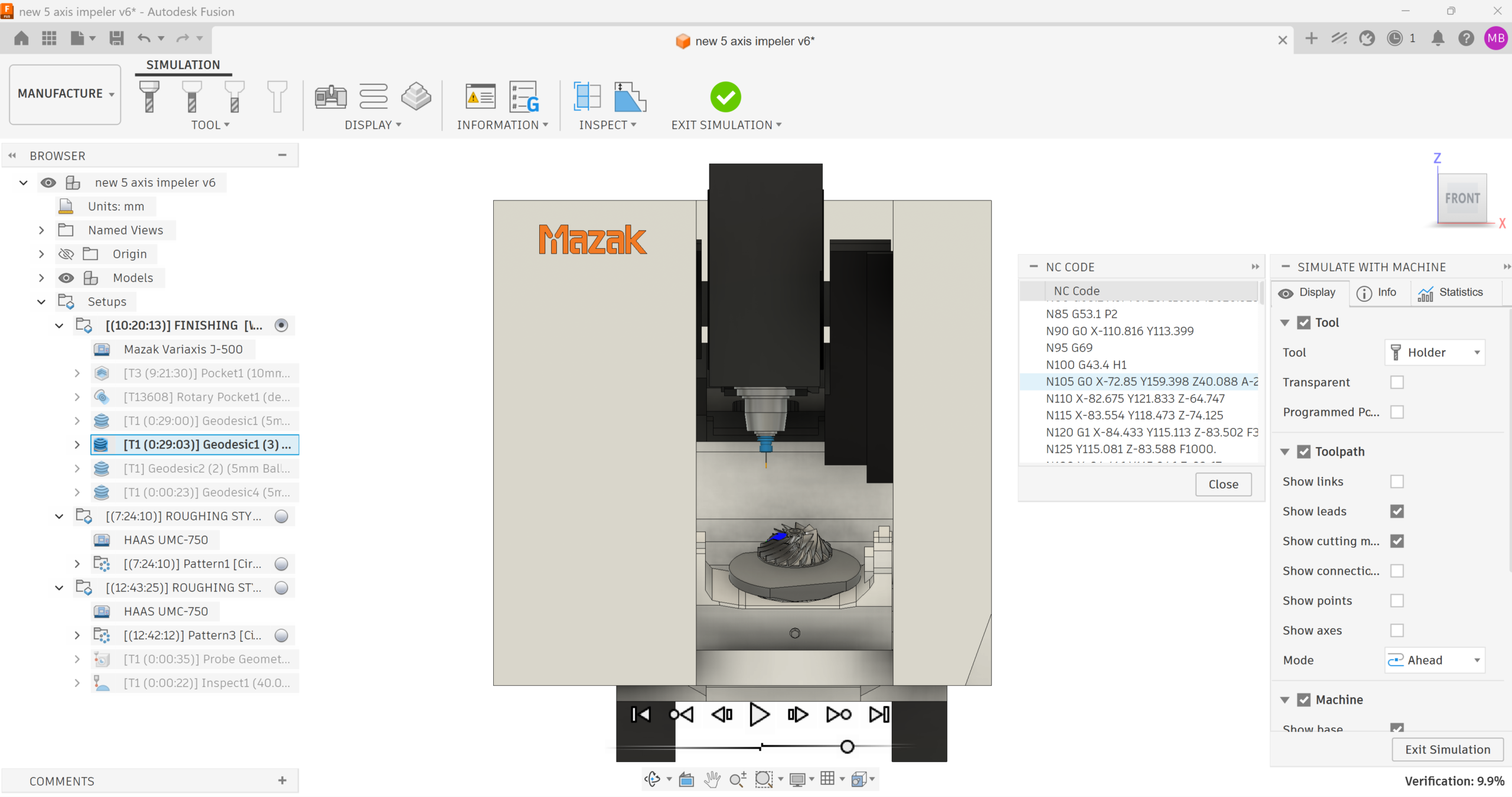
Full 3D machine simulation of the Mazak Variaxis in Fusion 360 helps detect and prevent programming crashes before hitting the shop floor
Fusion 360 post output — Mazak SmoothG ke liye G68.2 (Tilted Work Plane) aur G43.4 (RTCP) automatically correct generate hote hain. Zero manual editing.
Zero
Manual G-Code Editing
3
Full Machine Simulation — Crash Se Pehle Pakdo
Machine crash manufacturing mein lakhs ka nuksan karta hai — machine damage, downtime, scrap material. Fusion 360 ka machine simulation tumhe screen pe crash dikhata hai, real machine pe nahi.
Full 3D Machine Simulation — B-axis tilt, C-axis rotation, spindle, fixture, clamp sab virtually check. Red highlight aaye toh program fix karo — machine pe jaane se pehle.
✅B-axis tilt collision detect hoti hai
✅Fixture vs spindle nose check
✅Tool holder clearance verify
✅Machine damage avoid — guaranteed
4
Simultaneous 5-Axis Toolpaths — Poori Range
Fusion 360 Manufacturing mein Variaxis J-600 ki full 5-axis capability use karne ke liye sab strategies available hain — aerospace se mold tak, har complex part ke liye.
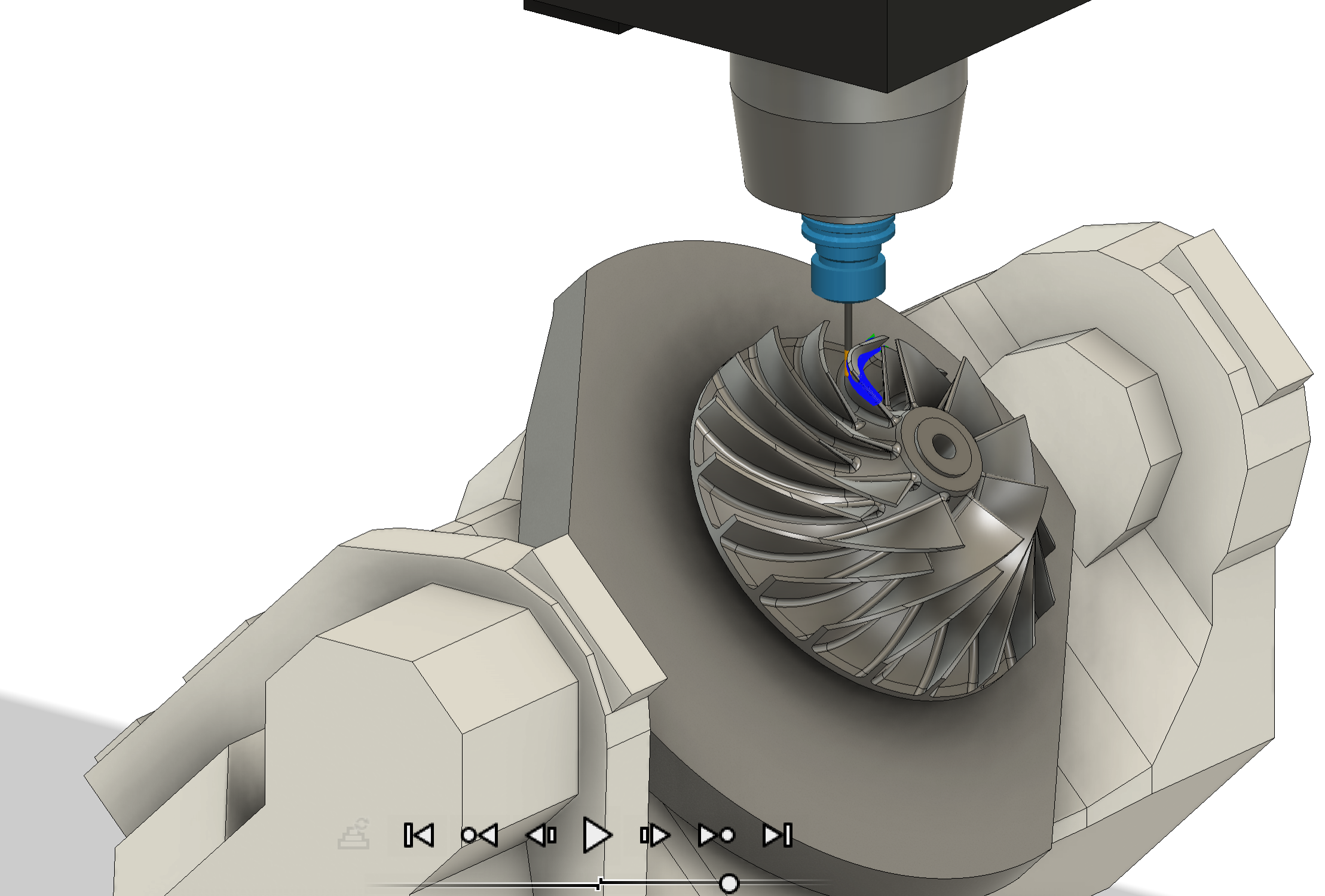
Fusion 360 — 5-axis simultaneous toolpath. Tool tilt angle automatically surface normal ke according calculate hota hai. Complex geometry ek setup mein machine hoti hai.
✅Multi-Axis Contour — walls & ribs
✅Swarf Machining — ruled surfaces
✅Scallop 5-Axis — curved surfaces
✅3+2 Positional — holes & pockets
5
India Mein Sabse Affordable 5-Axis CAM
Fusion 360 Manufacturing sirf ₹1,29,000/year per seat mein complete 3-axis, 4-axis, 5-axis, Turning, aur Mill-Turn deta hai. Iss price pe koi dusra software proven Mazak 5-axis post nahi deta.
₹5–15L
Perpetual CAM Cost
5-7x
Cost Saving vs Others
✅3-Axis + 4-Axis + 5-Axis included
✅Turning + Mill-Turn included
✅Machine simulation included
✅No extra AMC / hidden charges
6
Mazak iConnect — Direct Program Transfer
Fusion 360 ka Mazak iConnect Add-in directly Mazak ke Smooth Project Manager se connect hota hai. NC program, geometry, fixture, stock, aur tool data — sab wirelessly transfer. USB errors aur manual file transfer — gone.
Direct NC Transfer
Tool Data Sync
Zero USB Errors
Mazak SPM Integration
Mechman Ka 1-Din Implementation — Exactly Kaise Hota Hai?
1
Software Installation & Configuration
Fusion 360 Manufacturing subscription activate karke tumhare workstation pe install karte hain. Tool library, machine configuration, aur CAM settings — sab Variaxis J-600 ke liye specifically set hoti hain.
✅License activate & install
✅Tool library setup
✅CAM workspace configure
✅J-600 machine settings
2
Post Processor Setup — SmoothG / SmoothAi
Mechman ka pre-validated MAZATROL SmoothG ya SmoothAi post processor install karte hain — jo already actual Variaxis machine pe test kiya hua hai. Tumhe ek bhi line G-code manually nahi likhni padegi.
✅G68.2 Tilted Work Plane — correct
✅G43.4 RTCP — auto generate
✅Smooth controller compatible
✅Zero manual edits needed
3
Machine Simulation Configure Karo
Fusion 360 ke andar Variaxis J-600 ka full 3D machine simulation setup karte hain — B-axis, C-axis, spindle, fixture sab included. Ab tumhare programmer machine pe kuch bhi bhejne se pehle collision check kar sakte hain.
✅Full 3D machine model loaded
✅Collision detection active
✅Axis limit check
✅Fixture & clamp verification
4
Live Programming & First Part Run
Tumhare actual part geometry pe live demo karte hain — 5-axis toolpath create karna, simulation run karna, post karna, aur Mazak iConnect se machine pe transfer karna. Program first time run hota hai. Koi manual editing nahi.
Toolpath
Create → Simulate
5
Programmer Training — Team Ko Confident Banao
Mechman ka certified Autodesk training specifically Variaxis J-600 ke liye cover karta hai — tilted workplane setup, swarf cutting, multi-surface indexing, tool axis control, aur collision avoidance. Team usi din se productive.
5-Axis Strategy Training
WCS & Setup Training
Post Processor Training
Onsite — Aapki Factory Mein
Mechman Solutions Ko Kyun Choose Karo?
✓
Autodesk Authorized Channel PartnerOfficial reseller — Fusion 360, PowerMill, FeatureCAM, PartMaker
✓
Autodesk Certified Training CenterCertified trainers — professional development counted
✓
Proven Mazak Post ProcessorsSmoothG & SmoothAi — actual machine pe tested
✓
100+ Manufacturing ClientsISRO, L&T, Mahindra, Varroc, Jyoti CNC — trusted by leaders
✓
Same Day WhatsApp SupportProgramming ke dauran koi problem — turant response
✓
Pan-India Onsite SupportVadodara base — Gujarat se poore India mein factory visit
Humne Kaunsi Industries Ko Serve Kiya Hai?
✈️ Aerospace — ISRO, L&T
🚗 Automotive — Mahindra, Varroc
🏭 Mold & Die
⚕️ Medical Devices
🔩 Precision Engineering
⚙️ CNC Job Work
🏭 General Manufacturing
Conclusion 🎯
Mazak Variaxis J-600 ek powerful machine hai — lekin uska poora potential tabhi milega jab sahi CAM software, proven post processor, aur correct machine simulation saath mein ho.
Fusion 360 + Mechman Solutions ke saath tumhara machine Day 1 se productive hoga — EMI waste nahi hogi. 🚀
Mazak Variaxis J-600 Ke Liye Free Consultation
Mechman Solutions
Official Autodesk Channel Partner — Vadodara, Gujarat, India
100+ Clients · 10+ Years · Proven Mazak Post · Same Day Implementation · Pan-India Support
👉 Free Consultation — WhatsApp Karo
© 2025 Mechman Solutions | Official Autodesk Channel Partner · Autodesk Certified Training Center · Vadodara, Gujarat, India
