
5 axis programming software for Hass UMC – 400


5-Axis CAM Software Guide

Haas UMC-400 ke liye
5-Axis Programming โ€” Fusion 360 se
Day 1 Mein Start Karo

Haas-Autodesk Official Partnership ka faayda uthao โ€” Proven Post Processor, Machine Simulation aur Complete Indian Support ke saath. Chhoti machine, badi capability.

1 Din
Implementation
90+
Haas Machine Profiles
100%
5-Axis Compatible
2016
Mechman Vadodara

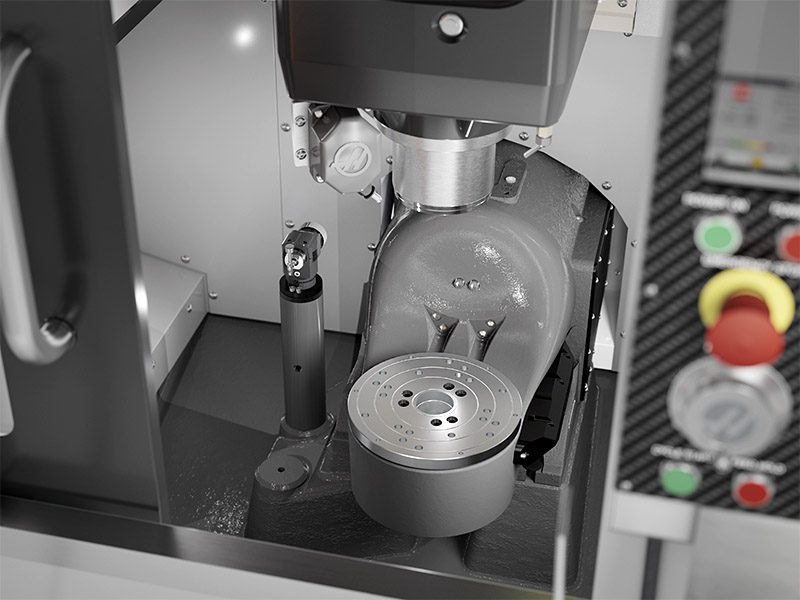
Haas UMC-400 5-Axis CNC machine ka internal workspace trunnion table aur spindle ke saath

Haas UMC-400 ke andar ka view jo dual-axis trunnion table setup ko dikhata hai.

๐Ÿ“ท Haas UMC-400 โ€” 5-Axis CNC Vertical Machining Center ย |
Source: haascnc.com โ†—

โš™๏ธ Haas UMC-400 โ€” Machine Specifications

Haas UMC-400 ek compact 5-axis machining center hai jo chhoti shops aur small-part 5-axis machining ke liye perfect hai. 7ft ร— 7ft footprint mein fit hota hai โ€” UMC-500 se 25% chhota.

X / Y / Z Travel
432 ร— 279 ร— 330 mm
(17″ ร— 11″ ร— 13″)
Spindle Speed
10,000 RPM
40-Taper Standard
Tool Changer
30+1 SMTC
Side Mount Tool Changer
Rotary Table (B/C)
ยฑ35ยฐ / 360ยฐ
Dual-Axis Trunnion
Machine Footprint
2.1 ร— 2.1 m
7ft ร— 7ft Compact
Controller
Haas NGC
Next Generation Control

7 Solid Kaaranein

Haas UMC-400 ke liye Fusion 360 Kyun?

Sirf software nahi โ€” Haas aur Autodesk ki official partnership, verified machine profiles, aur India mein proven support.
1

Official Haasโ€“Autodesk Partnership โ€” Verified Machine Library

Haas Automation aur Autodesk Fusion ne official partnership ki hai โ€” directly Fusion ke andar vetted machine models, post processors aur tooling data milta hai. Ye guess work nahi hai.

๐Ÿ“Œ Official fact: Fusion mein 90+ Haas machine profiles hain โ€” UMC-400 included. Haas NGC controller ke liye verified post processor directly milta hai.

โœ…
Haas UMC-400 ka exact 3D machine simulation model milta hai
โœ…
NGC post processor โ€” B/C axis ke liye pre-configured
โœ…
Haas tooling catalog directly Fusion library mein
โœ…
WiFi se Haas NGC se directly connect ho sakta hai

2

Simultaneous 5-Axis Toolpaths โ€” UMC-400 ke liye Perfect

UMC-400 ka compact trunnion design chhote precision parts ke liye ideal hai. Fusion 360 ke specialized 4- aur 5-axis toolpaths is machine ke saath perfectly match karte hain โ€” superior surface finish ke saath.

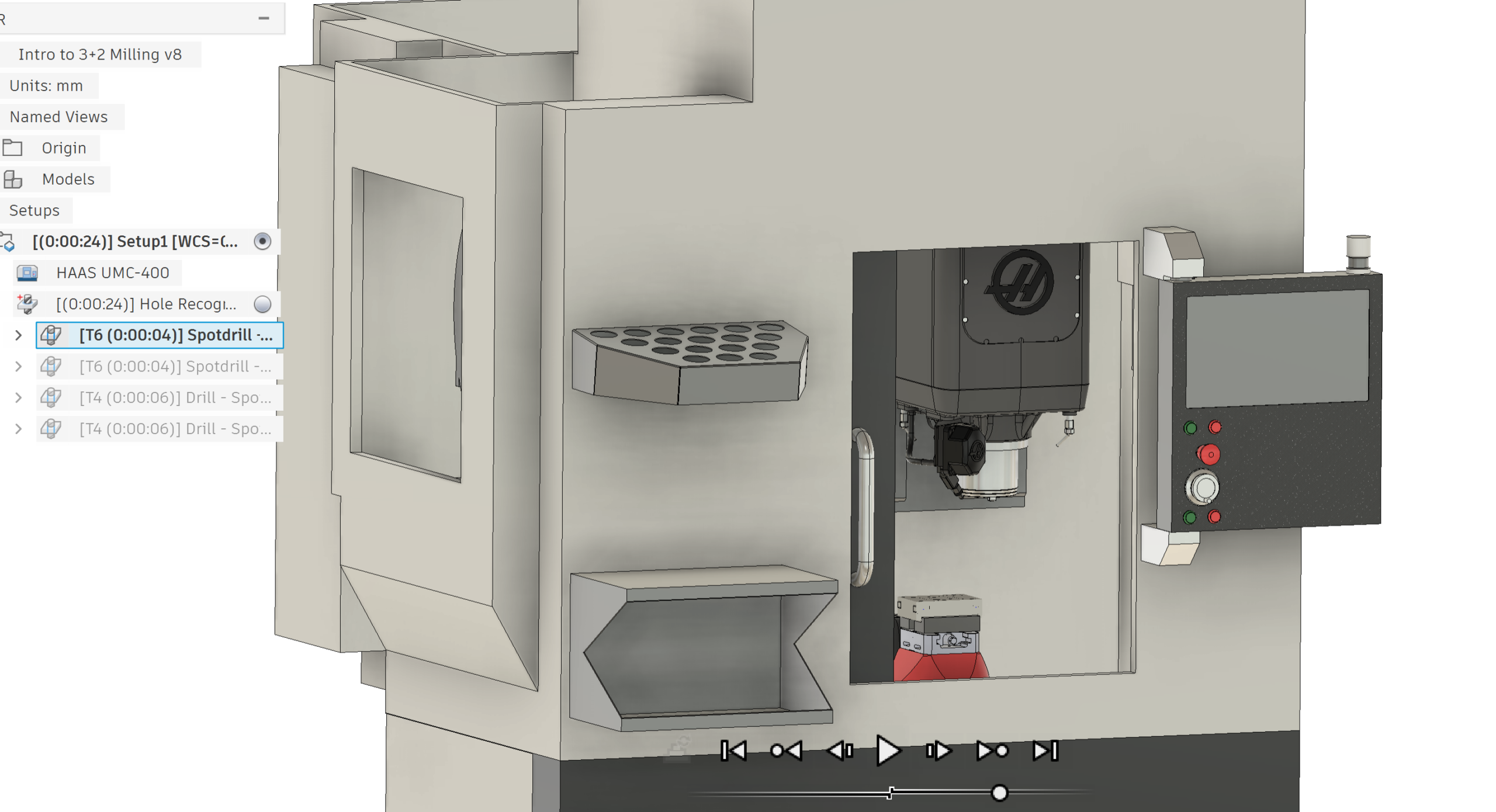
Autodesk Fusion 360 CAM workspace mein Haas UMC-400 5-Axis machine ka 3D toolpath simulation

Autodesk Fusion 360 mein Haas UMC-400 ka exact 3D machine simulation model setup.

๐Ÿ“ท Autodesk Fusion 360 โ€” CAM Manufacturing Workspace ย |
Source: autodesk.com โ†—

โœ…
3+2 Positional aur Simultaneous 5-Axis โ€” dono support
โœ…
Swarf Milling, Contour, Morphed Spiral โ€” advanced strategies
โœ…
Automatic collision avoidance โ€” trunnion tilt limits ke andar
โœ…
Tool axis control โ€” UMC-400 ke B-axis limits respect karta hai

3

Machine Simulation โ€” Crash se Pehle Pata Chal Jaata Hai

Fusion 360 mein UMC-400 ka exact virtual model load hota hai โ€” spindle, trunnion, table, fixturing sab kuch simulate hota hai. Production se pehle har collision, overtravel aur gouge computer pe pakad mein aata hai.

โš ๏ธ Industry Reality

5-axis machine pe crash hone ka matlab sirf part kharaab nahi โ€” spindle damage, workholding damage, aur costly downtime. Simulation ye risk zero karta hai.

โœ…
Full machine kinematics simulation โ€” B aur C axis sab
โœ…
Stock material removal real-time dekho โ€” verify karo
โœ…
Rapid traverse aur feed moves โ€” dono check hote hain
โœ…
Fixture aur clamp collision โ€” 5-axis mein sabse important

4

CADโ€“CAM Ek Hi Software Mein โ€” Zero Data Transfer Error

Fusion 360 mein design change hota hai to CAM automatically update ho jaata hai. STEP/IGES import ka jhanjhat nahi โ€” ek hi platform pe design se NC code tak.

โœ…
Parametric CAD changes โ€” CAM toolpaths auto-update
โœ…
Cloud storage โ€” team ke saath share karo instantly
โœ…
Revision history โ€” koi bhi version wapas la sako
โœ…
Import: STEP, IGES, SolidWorks, Inventor โ€” sab formats

5

Haas Tooling Library โ€” Feeds & Speeds Ready

Haas ka poora cutting tool catalog Fusion 360 mein directly available hai โ€” material-specific recommended feeds aur speeds ke saath. UMC-400 pe naya tool setup karna easy ho jaata hai.

โœ…
Haas cutting tools โ€” Fusion library mein pre-loaded
โœ…
Material-wise recommended cutting parameters
โœ…
Haas workholding 3D models โ€” simulation mein use karo
โœ…
9,000+ SKU Haas tools โ€” 5.5M+ worldwide sold

6

Adaptive Clearing โ€” UMC-400 ka Full Potential Use Karo

Fusion 360 ka Adaptive Clearing roughing strategy UMC-400 ke spindle aur structure ko protect karta hai โ€” consistent chip load maintain karke. Tool life badh jaati hai aur cycle time kam hoti hai.

โœ…
Trochoidal milling paths โ€” chhoti machine pe bhi aggressive cuts
โœ…
Tool engagement angle control โ€” spindle load monitor
โœ…
Rest machining โ€” roughing se finishing tak smooth transition
โœ…
Aluminum se Titanium tak โ€” material-specific strategies

7

Mechman โ€” India Mein Haas + Fusion 360 ka Proven Support

Sirf software khareedna kaafi nahi โ€” implementation aur training zaroori hai. Mechman Solutions Vadodara, 2016 se Indian manufacturers ko Fusion 360 implement karne mein help kar raha hai. Haas UMC-400 pe Day-1 se production-ready banana hamaari speciality hai.

โœ…
UMC-400 ke liye proven, tested post processor
โœ…
On-site training โ€” aapki shop floor pe
โœ…
Autodesk Authorized Channel Partner โ€” official license
โœ…
Post-sale CNC programming support โ€” akele nahi chhoda

๐Ÿš€ Haas UMC-400 pe Fusion 360 โ€” Day 1 Implementation Steps

Haas aur Autodesk ki official partnership ki wajah se UMC-400 pe Fusion 360 set up karna surprisingly fast hai. Ye 5 steps follow karo:

1
Fusion 360 Install + UMC-400 Machine Configuration

Fusion 360 install karo. Manufacturing workspace open karo. Machine Library se Haas UMC-400 select karo โ€” ya Mechman ka pre-configured machine profile directly use karo. Haas NGC post processor setup aadha kaam hai.

2
Post Processor Setup โ€” NGC Ready

Mechman ka UMC-400 ke liye tested post processor configure karo. B-axis limits (ยฑ35ยฐ), C-axis, work offset, coolant outputs โ€” sab pre-set hota hai. Pehli part pe hi sahi G-code milti hai.

3
CAM Setup โ€” 5-Axis Toolpath Programming

Fusion mein part load karo, Setup define karo, WCS set karo. 3+2 ya simultaneous 5-axis strategy select karo. UMC-400 ke liye Swarf, Contour, Parallel ya Adaptive โ€” jo part require kare. Tool axis tilting aur lead/lag angles set karo.

4
Machine Simulation โ€” Machine pe Bhejne Se Pehle Verify

UMC-400 ki virtual machine mein full simulation chalao. Spindle, trunnion, table, fixture โ€” sab dekho. Collision check, overtravel aur gouge detection automatically hoti hai. Green light aane ke baad hi post process karo.

5
๐ŸŽฏ Post Process + Machine Run โ€” First Part Baao!

Haas NGC post processor se G-code generate karo. USB ya WiFi se directly UMC-400 NGC control pe load karo. DNC connection possible hai Fusion se directly. Pehli 5-axis part usi din โ€” Day 1 mein!

โš ๏ธ Common Galtiyan โ€” Jo Beginners Karte Hain

โŒ GALTI #1
Generic Post Processor Use Karna

Generic Haas post processor UMC-400 ke B-axis limits aur trunnion kinematics properly handle nahi karta. Machine-specific post processor zaroori hai โ€” wrong G-code se crash hota hai.

โŒ GALTI #2
Simulation Skip Karna

5-axis mein “looks good on screen” kaafi nahi. Trunnion table ka compact size fixturing collision ka risk badhaata hai. Simulation skip karna costly mistake hai.

โŒ GALTI #3
MRZP Offset Set Na Karna

Machine Rotary Zero Point offsets galat hone se 5-axis part positioning off hoti hai. UMC-400 install ke time ye calibration properly karni chahiye. Fusion simulation sahi output tabhi deta hai jab machine MRZP sahi ho.

โŒ GALTI #4
Work Envelope Ignore Karna

5-axis mein cylindrical work envelope actual travels se chhota hota hai. UMC-400 ka compact size extra caution maangta hai. Part aur workholding design karte waqt rotational clearance check karna zaroori hai.

๐Ÿญ Kaun Si Industries Use Karti Hain Haas UMC-400?

UMC-400 ka compact size aur 5-axis capability ise precision small-part machining ke liye ideal banata hai โ€” ye industries sabse zyada use karti hain:

โœˆ๏ธ Aerospace Components
๐Ÿฅ Medical Devices
๐Ÿš— Automotive Precision Parts
โš™๏ธ General Engineering
๐Ÿ’Ž Jewelry & Watch Parts
๐Ÿ”ฉ Mold & Die (Small)
๐Ÿ›ก๏ธ Defense Components
๐Ÿ”ฌ R&D Prototyping

Mechman Kyun?

Sirf Software Nahi โ€” Complete CNC Programming Solution

Vadodara, Gujarat mein 2016 se โ€” Autodesk Authorized Channel Partner aur Certified Training Center

๐Ÿ†

Autodesk Authorized Partner
Official channel se genuine Fusion 360 license โ€” legal aur verified

๐ŸŽ“

Certified Training Center
Hindi/Gujarati mein training โ€” aapke operators samjhein

โšก

Day-1 Implementation
UMC-400 ke liye tested post processor โ€” pehle din se production-ready

๐Ÿ”ง

CNC Programming Support
Complex 5-axis parts mein hamare engineers aapke saath

๐Ÿ“š Related Blogs โ€” Aur Padhein

Fusion 360 Guide
Fusion 360 5-Axis Machining Complete Guide
mechmansolution.com โ†—


5-Axis Programming
Okuma Genos M460V-5AX โ€” Fusion 360 Se Program
mechmansolution.com โ†—


CAM Software Guide
Sliding Head CNC ke liye Best CAM Software
mechmansolution.com โ†—


Mold Making
PowerMill vs Fusion 360 โ€” Mold Making ke liye
mechmansolution.com โ†—


Abhi Shuru Karein

Haas UMC-400 pe Fusion 360 Khareedein
Aaj Hi Contact Karein

Software purchase, post processor setup, aur Day-1 implementation โ€” sab ek jagah. Mechman Solutions aapki help ke liye ready hai.

๐Ÿ“ž
Call / WhatsApp
+91 99137 89065
โœ‰๏ธ
Email
mechmansolution@gmail.com
๐Ÿ“
Location
Vadodara, Gujarat

WhatsApp Pe Message Karein

๐Ÿ• Response time: 1-2 เค˜เค‚เคŸเฅ‡ ย |ย  ๐Ÿ“… Free Consultation Available ย |ย  ๐Ÿ‡ฎ๐Ÿ‡ณ Made in India โ€” For India

Related Posts