
HAAS VF2 KA PROGRAMMING
Kaise Kare — Manually aur Autodesk Fusion 360 Se | Complete Step-by-Step Guide
01 — Introduction
Haas VF2 Machine Kya Hai?
Haas VF-2 ek Vertical Machining Center (VMC) hai — yani aisa CNC machine jo upar se neeche (vertical) kaam karta hai. Ye America ki sabse popular CNC machine hai. Haas Automation ki VF Series mein ye sabse zyada bikne wali model hai — isliye ise “shop ka workhorse” bhi kehte hain.
Ye machine aluminum, steel, stainless, aur plastics — sab kuch machine kar sakti hai. Medical parts se lekar aerospace components tak, VF2 har jagah kaam aati hai. India mein bhi iske users tezi se badh rahe hain.
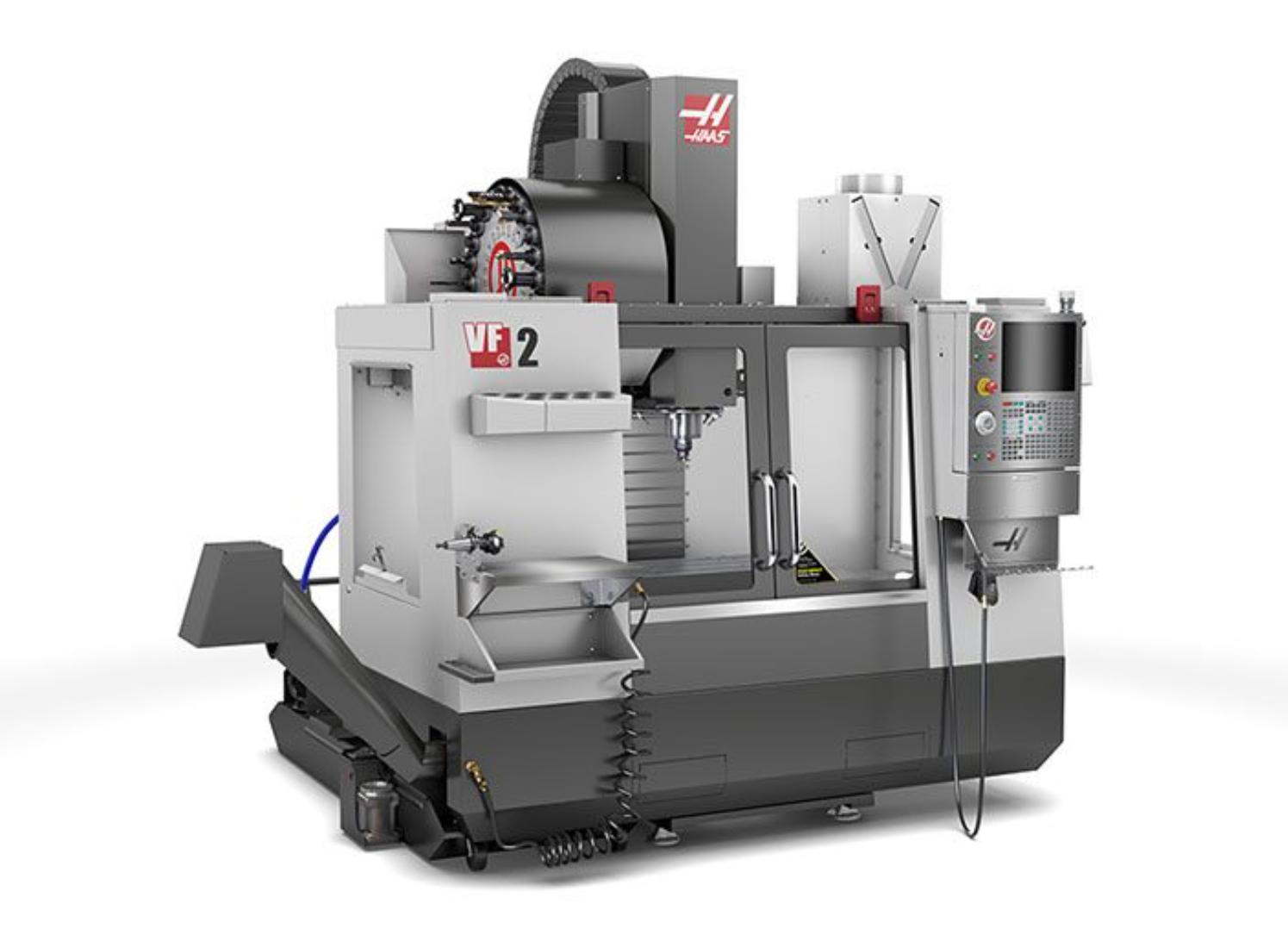
The Haas VF2: A high-performance VMC capable of 8100 RPM and 30 HP vector drive.
02 — Manual Method
Manual G-Code Programming — Kya Sikhna Padta Hai?
Pehle aate hain traditional method pe — jisme aap khud haath se G-code aur M-code likhte hain. Ye method tab kaam aata hai jab simple parts banana ho, ya machine ko depth se samajhna ho. Lekin iske liye kaafi knowledge chahiye hoti hai.
Blueprint Reading
Part ka drawing padhna aana chahiye — dimensions, tolerances, surface finish symbols, GD&T basics. Bina drawing samjhe program nahi banta.
G-Code & M-Code
G00 rapid, G01 linear feed, G02/G03 arc, G41/G42 cutter comp, M03 spindle on, M08 coolant on — ye sab yaad rakhne padte hain.
Work Offsets (G54–G59)
Machine ko batana hota hai ki part kahan rakha hai. G54 se G59 tak ke work coordinates set karna aana chahiye.
Tool Offsets & Compensation
Har tool ki length aur diameter offset dalni hoti hai. Cutter compensation (G41/G42) se accurate parts bante hain.
Feeds & Speeds
Material ke hisaab se spindle RPM (S), feed rate (F), aur depth of cut decide karna — ye experience se aata hai.
Haas Control Panel
Haas ka 15″ LCD control, MDI mode, program edit, jog handle, one-touch functions — sab operate karna aana chahiye.
🔢 G-Code Example — Simple Rectangular Pocket (Haas VF2)
N10  ( RECTANGULAR POCKET - HAAS VF2 - ALUMINUM 6061 )
N20  ( TOOL: T1 - 12MM END MILL )
N30  G17 G20 G40 G49 G80 G90    ( Safe startup line )
N40  G28 G91 Z0.             ( Z-axis home )
N50  T01 M06                   ( Tool change - 12mm end mill )
N60  G54                       ( Work offset G54 )
N70  G90 G00 X-25. Y-20.       ( Rapid to start position )
N80  S3500 M03                ( Spindle 3500 RPM, clockwise )
N90  G43 H01 Z5.             ( Tool length compensation )
N100 M08                       ( Coolant ON )
N110 G01 Z-5.  F200.          ( Plunge to -5mm depth )
N120 G01 X25.  F500.          ( Cut along X+ )
N130 G01 Y20.                  ( Cut along Y+ )
N140 G01 X-25.                 ( Return on X- )
N150 G01 Y-20.                 ( Close the pocket )
N160 G00 Z50.                  ( Rapid Z up - safe height )
N170 M09                       ( Coolant OFF )
N180 M05                       ( Spindle OFF )
N190 G28 G91 Z0. Y0.          ( Home position )
N200 M30                       ( Program end )
03 — Smart Method: CAM Software
Fusion 360 Se Automatic Programming
Ab aate hain Autodesk Fusion 360 pe — jo ek complete CAD + CAM software hai. Isme aap 3D model banao, tool paths define karo, aur software automatically G-code generate kar deta hai Haas VF2 ke liye.
Haas aur Autodesk ne official partnership ki hai — isliye Fusion 360 mein Haas VF2 ke liye dedicated post processor aur complete Haas tool library already available hai. Official partnership details →
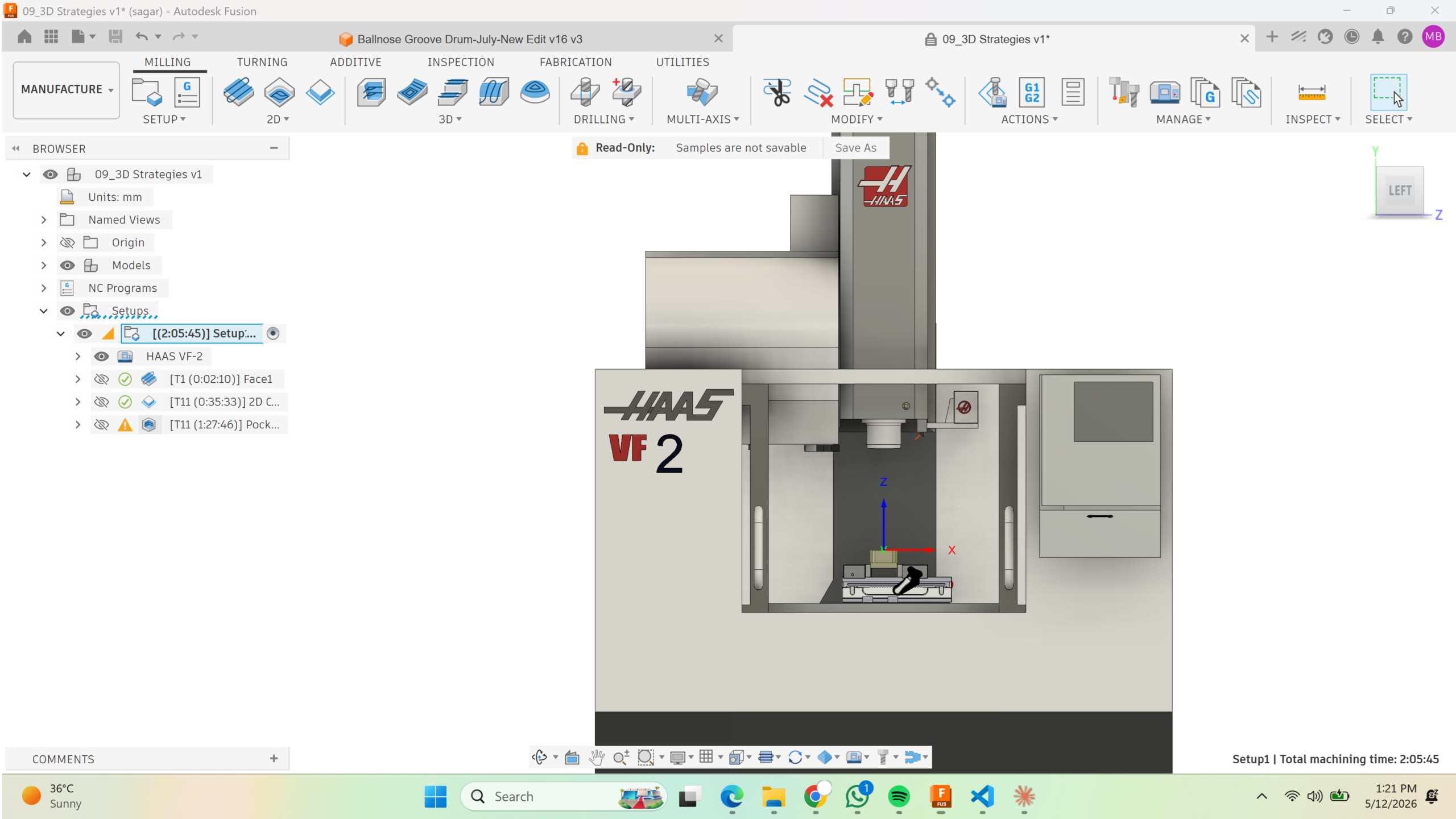
Live Demo: Executing a high-precision milling program on the Haas VF2 using Autodesk Fusion 360.
FUSION 360 MEIN HAAS VF2 PROGRAMMING — STEP BY STEP
CAD Model Banao ya Import Karo
Fusion 360 ke CAD workspace mein apna part design karo, ya STEP, IGES, DXF format mein import karo. 3D model hi aapka starting point hai.
Manufacture Workspace Kholo
Top mein “Manufacture” workspace select karo. Yahan se CAM ka kaam shuru hota hai. Setup banao — machine, stock material, aur work coordinate system define karo.
Haas VF2 Machine Select Karo
Machine library mein se “Haas VF-2” select karo. Fusion mein 25+ Haas-specific machines pre-loaded hain — thanks to Haas-Autodesk partnership. Isse simulation bhi accurate hoti hai.
Tool Library Se Tools Select Karo
Fusion ke online tool library mein Haas ka complete tooling catalog available hai — recommended feeds & speeds ke saath. End mill, drill, face mill — sab wahan se lo.
Tool Paths Define Karo
2D Contour, 2D Pocket, Drilling, 3D Adaptive Clearing — operation choose karo, faces select karo, parameters dalo. Software automatically optimal tool path calculate karta hai.
Simulation Chalao — Machine Pe Jaane Se Pehle
Fusion ke simulation mein dekho — kya tool paths sahi hain, koi collision to nahi, material properly remove ho raha hai. Ye step crash se bachata hai!
Post Process — G-Code Generate Karo
“Post Process” click karo, Haas VF-2 post processor select karo — ek click mein perfect G-code ready. Ye file USB ya Ethernet se directly Haas machine pe jaati hai.
Fusion 360 Mein Haas VF2 Programming — Real Machine Par
“Haas aur Autodesk Fusion ne officially partnership ki hai — Fusion 360 mein Haas machines ke liye best-in-class support milta hai. Haas ke customers khud Fusion 360 ko apni first choice mante hain.”
— Haas Automation + Autodesk Official Partnership | haascnc.com/testimonials
04 — Comparison
Manual G-Code vs Fusion 360 — Kya Better Hai?
| Factor | Manual G-Code | Fusion 360 CAM |
|---|---|---|
| Seekhne ka Time | Mahine / saal lagte hain | Hafte mein basic seekh sakte ho |
| Complex Parts | ✗ Bohot mushkil, galtiyan aam | ✓ 3D complex parts bhi aasaan |
| Crash Risk | ✗ High — ek galti = crash | ✓ Simulation pehle dekhte ho |
| Programming Speed | Ghante lagte hain | Minutes mein G-code ready |
| Haas Compatibility | Manual tuning chahiye | ✓ Dedicated Haas post processor |
| Tool Library | Manually enter karna padta hai | ✓ Full Haas catalog built-in |
| Simulation | ✗ Machine pe jaane se pehle nahi | ✓ Full 3D simulation included |
| Best For | Simple parts, machine basics samajhna | Production work, complex geometry |
05 — MechMan Solution
Software + Training — Aapke Paas Aakar
On-Site Training
MechMan Solution aapke factory ya workshop pe aakar Fusion 360 ka training deta hai. Aapki machine pe, aapke parts ke saath — real-world training jo actually kaam aaye.
Software Support
Fusion 360 setup se lekar Haas VF2 ke liye post processor configuration tak — MechMan Solution har step pe guide karta hai.
Haas VF2 Specific Training
Control panel operation, work offsets, tool setting, DNC transfer — sab kuch Haas VF2 ke context mein sikhate hain. No generic training.
Ongoing Support
Training ke baad bhi support milti hai. Koi problem aaye Fusion 360 ya Haas machine mein — MechMan Solution available hai.
Ready to Upgrade?
Ab manual G-code ki tension chhodo. Fusion 360 se apni Haas VF2 ki poori power unlock karo — MechMan Solution aapke company aakar sikhayega.
Haas VF2 Expert Guidance
📎 Official Reference Links:
• Haas VF-2 Official Page — haascnc.com
• Autodesk Fusion 360 + Haas Partnership — autodesk.com
• Haas Customers Ka Fusion 360 Experience — haascnc.com