CAD
→
CAM
POST
→
CNC
🔗 Digital Manufacturing Guide — WinFusion 2025
Digital Manufacturing Explained —
CAD Model Se CNC Machine Tak Connected Workflow! 🔗
CAD → CAM → Tool Library → Simulation → Post Processor → NC → CNC → Feedback
Complete Digital Manufacturing Flow:
CAD ⭐
→
CAM
→
Sim ⭐
→
Post ⭐
→
NC
→
CNC ✅
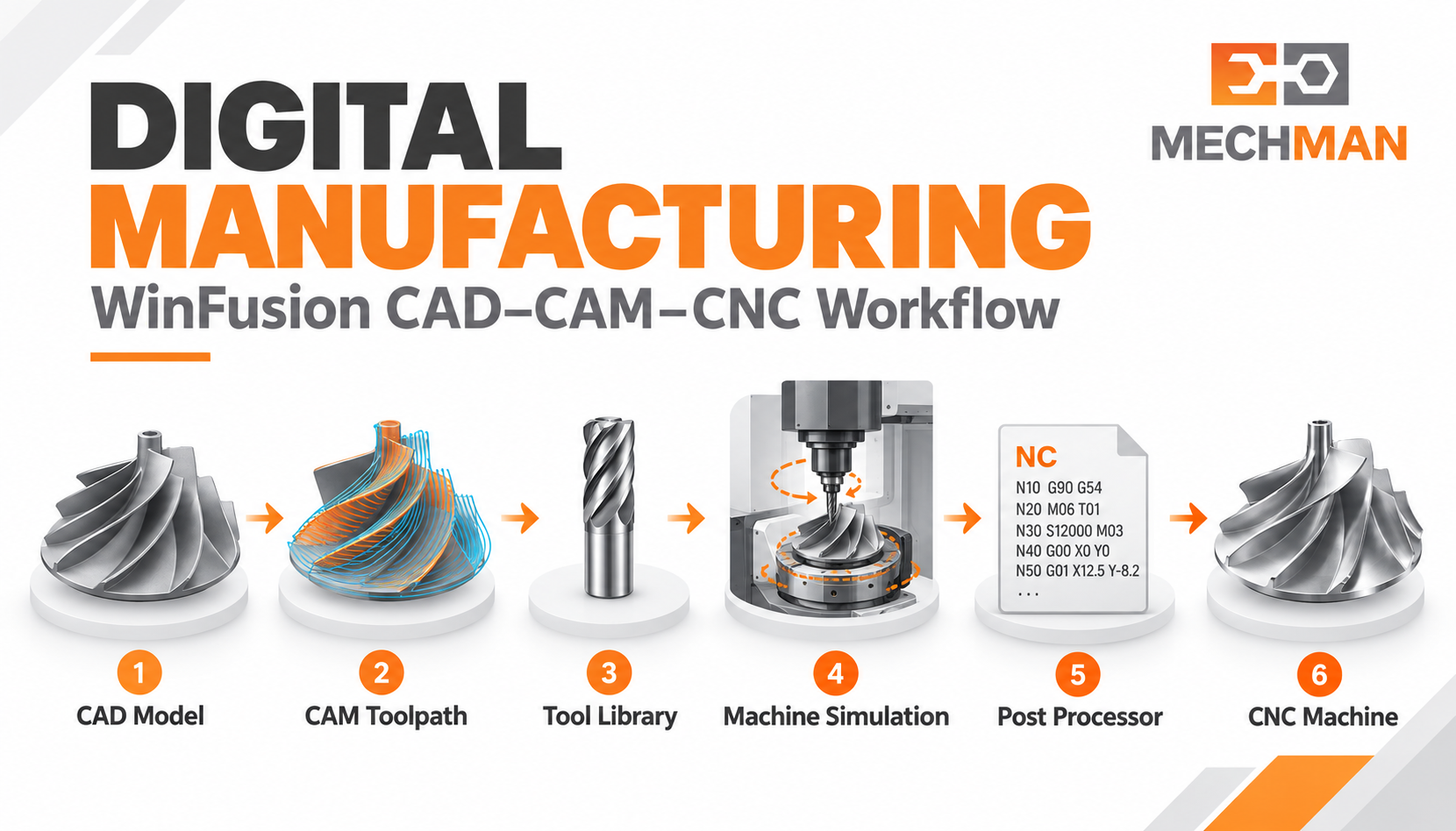
Digital manufacturing = CAD model se CNC machine tak information aur decisions ko connected rakhna. Traditional process mein design, notes, tool details alag-alag — connected digital workflow mein team ek clear model aur documented setup se kaam karti hai!
Digital manufacturing ka matlab hai manufacturing decisions ko digital data ke saath plan, test, share aur execute karna! CNC shop mein iska practical flow: 3D CAD → CAM → simulation → post processor → NC → CNC machine → inspection! WinFusion workflow CNC programming aur machine implementation wale part par focus karta hai — CAM se CNC tak connected, verified, documented process!
“Digital manufacturing ka practical purpose: CAD model se CNC machine tak information aur decisions ko connected rakhna. WinFusion is journey ke CAM-to-machine implementation stage mein fit hota hai!” ✅
Important distinction: Digital manufacturing poori factory ka broad concept hai. WinFusion uske CNC programming aur machine implementation wale part par focus karta hai. Factory-wide live monitoring alag systems maang sakte hain! ✅
🌀 Blade Machining Example — 7-Step Digital Workflow!
5-Axis turbine blade — digital workflow practically kaise kaam karta hai — step by step:
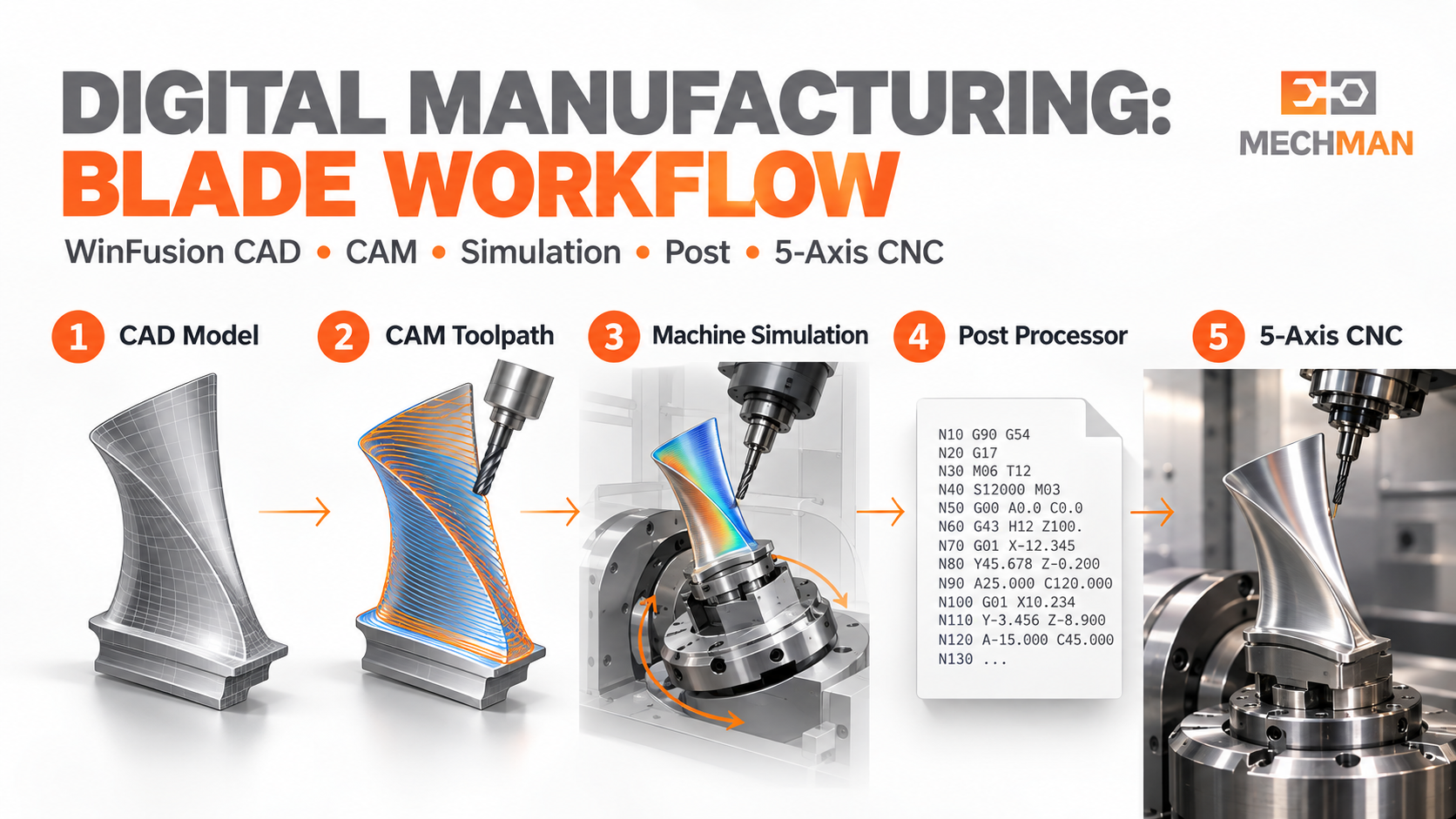
Turbine blade: Curved surface, tool angle, holder clearance, rotary movement — sirf screen par toolpath dekhna enough nahi. 7-step digital workflow se sab connected aur verified!
1
CAD Model & Manufacturing Requirements Samjho ⭐
Blade 3D model, material, stock size, tolerance, surface finish check karo. Fixture mein kaise hold hoga, datum kahan — sab define karo.
Model latest revision — first control point! Wrong revision = wrong part! ⭐
2
Machine & Setup Define Karo ⭐⭐
CAM setup mein correct machine configuration, axis arrangement, stock, fixture aur WCS/datum enter karo. 5-axis ke liye rotary limits aur kinematics especially important!
Rotary limit issue — machine alarm ke baad nahi, setup stage par pakadna chahiye! ⭐⭐
3
Tool Library Ready Karo ⭐
Cutter ke saath holder, cutting length aur stick-out define karo. Blade finishing mein cutter tip clear — par holder adjacent blade ya fixture se takra sakta hai!
Real shop tools se tool library setup = repeatable setup + useful simulation! ⭐
4
CAM Toolpath & Tool Axis Plan Karo ⭐
Roughing + rest machining + finishing strategies. 5-axis blade par tool axis angle surface access aur holder clearance dono affect karta hai.
Toolpath ka visual preview final proof nahi — machine movement bhi verify karo! ⭐
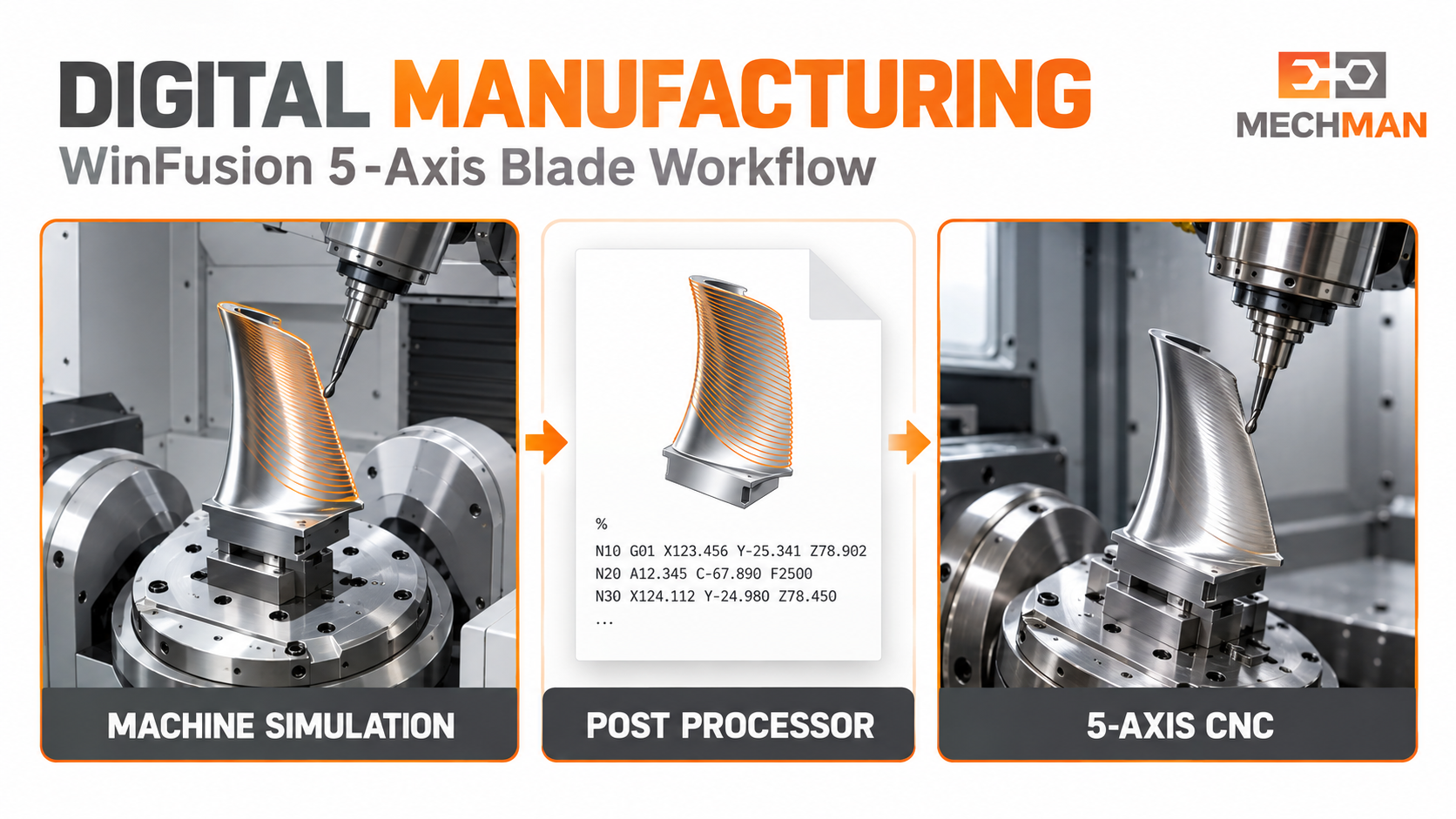
WinFusion: CAM toolpath → Machine simulation (rotary + holder + fixture) → Proven post → NC code. Har step connected!
5
Simulation Se Program Check Karo ⭐⭐
CRITICAL
Stock removal, tool aur holder clearance, fixture interference, rotary movement aur machine limits review karo.
Toolpath Sim:
Cutting path + stock removal
Machine Sim ⭐⭐:
Full machine movement + limits!
6
Correct Post Processor Se NC Code Nikalo ⭐⭐
Machine model + controller configuration ke hisaab se post select aur validate karo. Generic post available ≠ aapki exact machine par proven!
5-axis: Rotary moves + tool changes + retracts + controller commands carefully verify karo! ⭐⭐
7
Machine Trial & Feedback Workflow Mein Lao ✅
Operator setup sheet ke against tools, offsets, fixture confirm kare. Controlled first run ke observations programmer ko wapas milein. Approved corrections CAM ya post mein record karo!
Feedback loop = next job mein wahi problem dobara nahi! Yahi digital manufacturing ka value hai! ⭐
✅ CNC Company Ko Kya Benefit Mil Sakta Hai?
Connected digital workflow se in challenges ka practical solution:
Challenge
Digital Workflow Ka Practical Benefit
Latest model ka confusion
Revision aur machining setup clearly track ho sakta hai ⭐
Programmer-dependent tool data
Shared tool library se setup standardize ho sakta hai ⭐
5-axis movement uncertainty
Machine simulation se limits aur clearance pehle review ho sakte hain ⭐⭐
NC code mein repeated edits
Validated machine-specific post se output zyada consistent ho sakta hai ⭐
Machine purchase ke baad slow start
Software + post + simulation + training ek plan mein → faster ramp-up! ✅
Result guaranteed nahi — time saving part complexity, machine condition, correct setup data, programmer skill aur on-machine validation par depend karta hai! ⭐
❓ Nayi Machine Lene Se Pehle — 6 Key Questions!
Software quotation ke saath yeh details bhi discuss karein — production delays avoid honge:
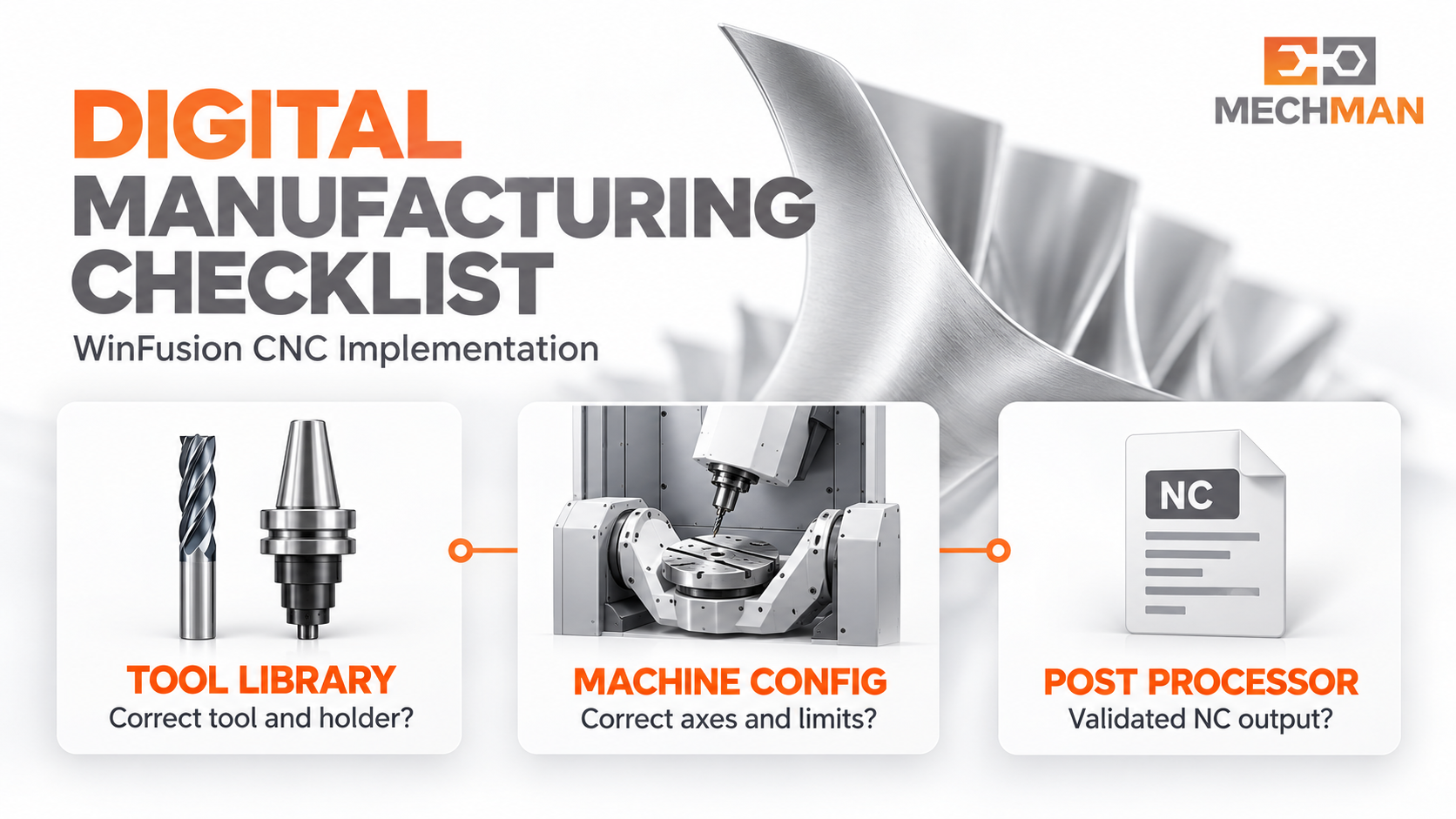
WinFusion: Machine make + controller + post + simulation + tool library + training = complete implementation plan. Machine installation ke baad delays avoid karne ka best way!
Q1
Exact machine make, model aur controller kya hai? ⭐⭐
Q2
Axis configuration aur travel limits kya hain? ⭐
Q3
Post processor available hai, ya customization chahiye? ⭐⭐
Q4
Machine simulation ke liye model aur kinematics kaise set honge? ⭐
Q5
Tool library aur fixture data kaun prepare karega? ⭐
Q6
First part trial, programmer training aur support ka scope kya hoga? ✅
Digital Manufacturing — WinFusion Ka Connected Workflow! 🔗
CAD se CNC tak 7-step connected digital workflow — tool library, simulation, validated post aur feedback loop se process repeatable aur predictable banta hai!
WinFusion: CAD + CAM + Tool Library + Simulation + Proven Post + Feedback Loop = Digital Manufacturing Excellence! 🔗🚀
🔗
Digital Manufacturing | CAM | Simulation | Post Processor | CNC
Machine make, model, controller aur part type share karein — implementation discuss karein!
Mechman Solutions — WinFusion
Autodesk Authorized Partner | Vadodara, Gujarat | Since 2015
www.mechmansolution.com
© 2025 Mechman Solutions | WinFusion — Digital Manufacturing Explained | Vadodara, Gujarat