G54
X0Y0
Z0
📍 Datum & WCS Guide — WinFusion 2025
Wrong Datum Problems in 5-Axis CNC —
CAM Sahi, Machine Par Position Galat Kyun? 📍
WCS Mismatch | G54/G55 Error | Z0 Wrong | Axis Direction | Simulation | Verify Chain
Reliable Result Ke Liye — Ye Chain Match Honi Chahiye:
CAM WCS ⭐
→
Posted Offset
→
Machine Table
→
Actual Part ✅

CAM simulation mein toolpath bilkul sahi — NC program machine par load kiya — tool expected position se hatkar move kiya! Reason: Wrong datum. CAM mein jis point ko part zero maana, machine par usi point ko zero set nahi kiya gaya!
Turbine blade toolpath banaya, simulation pass kiya, NC program generate kiya — phir bhi machine par tool galat jagah move karta hai? Programmer ko lag sakta hai toolpath ya post mein problem hai — kai baar asli reason wrong datum hota hai! CAM mein jis point ko part zero maana gaya, machine par usi point ko zero set nahi kiya gaya — yahi mismatch poora program shift kar deta hai!
“CAM ko lagta hai part kahan hai, aur machine ko lagta hai part kahan hai — dono locations match honi chahiye. Best toolpath aur proven post bhi tabhi kaam karega!” ✅
Ye sirf 5-axis ki problem nahi — 3-axis, 4-axis, turning sab mein ho sakta hai. 5-axis mein rotary movement judne se diagnosis aur prove-out aur demanding ho jaata hai! ✅
📍 Turbine Blade Ka Practical Example — Kya Galat Hota Hai?
Ek hi blade blank — CAM setup aur actual machine setup ka mismatch = poora program shift!
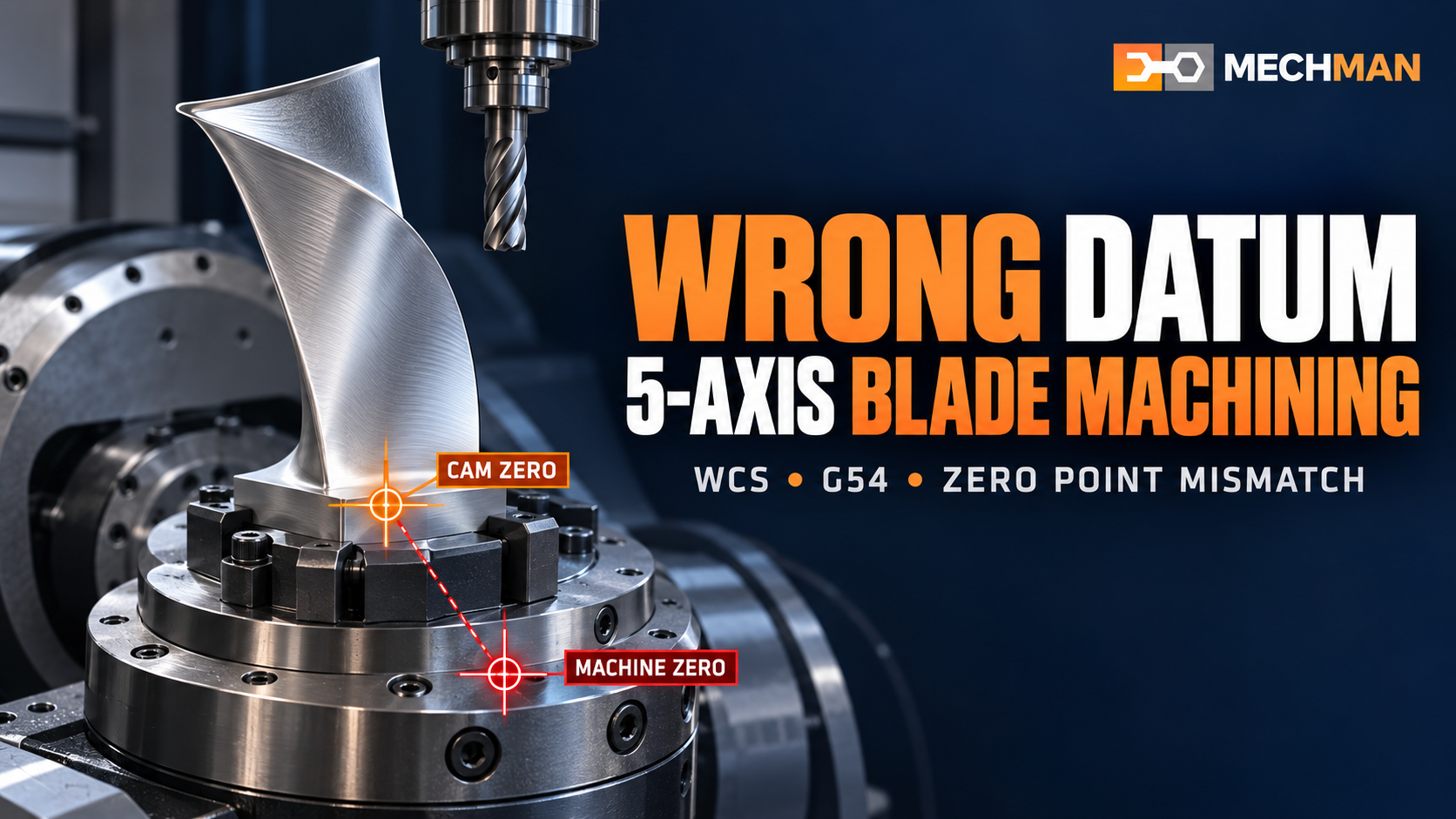
Same blade blank — CAM mein fixture centre = zero, machine par fixture corner = zero. Sirf origin mismatch se poora program shift ho gaya!
Item
CAM Setup
Actual Machine ⚠️
X0 Y0
Blade fixture ka centre ✅
Fixture ke corner par ⚠️
Z0
Stock ki top face ✅
Finished part ki top face ⚠️
Work Offset
G54 program mein ⭐
Operator ne G55 set kiya! 💥
Result: Tool air mein cut kar sakta hai, extra material remove kar sakta hai, ya fixture ki taraf ja sakta hai! ⚠️
⚠️ Wrong Datum Ki 7 Common Wajah!
1
CAM Aur Machine Par Alag Zero Point ⭐⭐
Programmer ne CAM mein stock top centre choose kiya, operator ne part top corner probe kiya. Dono valid references hain — lekin bina adjustment ke interchangeable nahi!
Fix: Setup sheet par zero location ko image ya marked drawing ke saath clearly show karein! ⭐
2
G54/G55 Work Offset Mismatch ⭐⭐
NC program G54 call karta hai, lekin required position G55 mein saved hai. Multiple fixtures ya parts wali jobs mein aasani se hoti hai yeh galti!
Fix: Output NC code mein actual G54/G55 command verify karo — sirf CAM dialog mein number dekhkar assume mat karo! ⭐
3
X, Y Ya Z Direction Ulti Hona ⭐
Origin sahi point par — lekin axis orientation galat. Programmer ka positive X blade root se tip, machine setup ka opposite! Poora toolpath mirror ho jaata hai!
Fix: CAM coordinate triad, fixture orientation aur machine ke positive axis directions compare karein! ⭐
4
Z0 Stock Par Hai Ya Finished Part Par — Clear Nahi
Programmer aur operator alag surface ko Z0 samajh rahe hain → cutting depth aur clearance dono affect hote hain! Stock top? Finished face? Fixture reference?
Fix: Z0 surface clearly define karo setup sheet mein — sabke liye ek hi reference! ⭐
5
Fixture Ya Part Ki Physical Placement Badal Gayi
Pichhle approved job ka CAM setup reuse hua, lekin nayi clamping position, spacer ya fixture height update nahi hui. Purana work offset ab actual setup represent nahi karta! Update karo! ⭐
6
Multiple Setups Ka Offset Mapping Galat ⭐
Blade ki first operation ek orientation, second doosri. Setup change ke baad wrong offset call ho to second operation misalign hogi. Multiple WCS use karte waqt post config aur retract behaviour bhi review karo! ⭐
7
Machine Simulation Mein Part Placement Galat ⭐⭐
Simulation tabhi useful result degi jab selected machine + workpiece placement + setup actual machine ko represent karein. Wrong simulation placement → misleading results!
Fix: Simulation mein part ko CNC machine ke andar correctly position karo — ek explicit verify step! ⭐⭐
🔍 Wrong Datum Ko Kaise Pehchanein? — Symptoms!
In symptoms par WCS aur offset PEHLE check karein:

Symptom pattern se cause narrow karo — phir check karo. Ek clue mil jaaye to individual toolpaths edit karne se pehle common setup reference check karo!
Har toolpath same direction mein shift ⭐⭐→ Part zero / work offset mismatch
Tool air cutting kar raha hai→ Z0 ya X/Y location check
Program start par unexpected position ⭐→ Active offset + initial NC commands
Ek setup sahi, doosra galat→ Setup-specific WCS + offset
CAM sim sahi, machine par galat ⭐⭐→ Physical datum + measured offsets
⚙️ WinFusion Workflow — Wrong Datum Avoid Karne Ke 5 Steps!
1
Ek Clear Datum Plan Banayein — Programming Se Pehle! ⭐⭐
Decide karo: ⭐
- X0 Y0 kis physical feature? ⭐
- Z0 kis face par? ⭐
- Part kis direction mein clamp?
Document karo: ⭐
- First + subsequent setup offsets
- Operator zero kaise establish kare
- Edge finder / probe / fixture ref?
2
Fusion CAM Setup Verify Karein ⭐
WCS orientation ⭐
WCS origin check
Stock size match ⭐
Model selection
Actual blank match ✅
3
Work Offset & Posted NC Code Match Karein ⭐⭐
CRITICAL ⭐⭐
❌ Wrong approach:
CAM dialog mein number dekha → assume kar liya. Post output verify nahi kiya!
→
✅ WinFusion Fix:
Post Process tab check → Generated NC mein actual G54/G55 command verify karo! ⭐
4
Machine Simulation Mein Setup Verify Karein ⭐

Machine simulation: Actual machine definition + fixture + holder + stock + correct part placement ke saath simulate karo. Digital setup error pakadne ka chance — lekin measured offset bhi independent confirm karo!
Fixture placement ⭐
Actual se match
Rotary motion ⭐
Clearance inspect
Part position ✅
Correctly defined
✅
Machine Par First Run Verification — Controlled Prove-Out! 🚀
→Operator + programmer setup sheet ke against physical zero aur active offset confirm karein ⭐
→Single block + reduced overrides + initial movement controlled observe karein ⭐
→Successful first run ke baad hi production release karein! ✅
⚙️ Proven Post Processor Wrong Datum Ko Fix Kar Sakta Hai?
Nahi — apne aap nahi. Proven post CAM instructions ko correct NC format mein convert karta hai. Lekin agar operator ne physical G54 zero galat location par set kiya hai, to correct NC code bhi galat reference se execute hoga!
Reliable result: CAM WCS → Posted work offset → Machine offset table → Actual part location — ye poori chain match honi chahiye! ⭐⭐
Wrong Datum — Chain Match Karo, Problem Solve Hogi! 📍
7 causes, 5 verification steps aur complete chain — WinFusion workflow se datum problem systematically prevent karo!
WinFusion: Clear Datum Plan + CAM WCS + Offset Verify + Simulation + Controlled First Run = Wrong Datum Problems Solved! 📍🚀
📍
Datum | WCS | G54/G55 | Machine Simulation | Post Processor
Machine model, controller, axis config aur sample part details share karein!
Mechman Solutions — WinFusion
Autodesk Authorized Partner | Vadodara, Gujarat | Since 2015
www.mechmansolution.com
© 2025 Mechman Solutions | WinFusion — Wrong Datum Problems in 5-Axis CNC | Vadodara, Gujarat
