🧭 WCS & Orientation Guide — WinFusion 2025
WCS & Tool Orientation —
CNC Programming Ka Foundation! 🧭
Work Coordinate System | G54/G55 | Tool Direction | 3+2 | 4-Axis | 5-Axis | Multi-WCS
Program Zero = Machine ka G54/G55 Work Offset ⭐
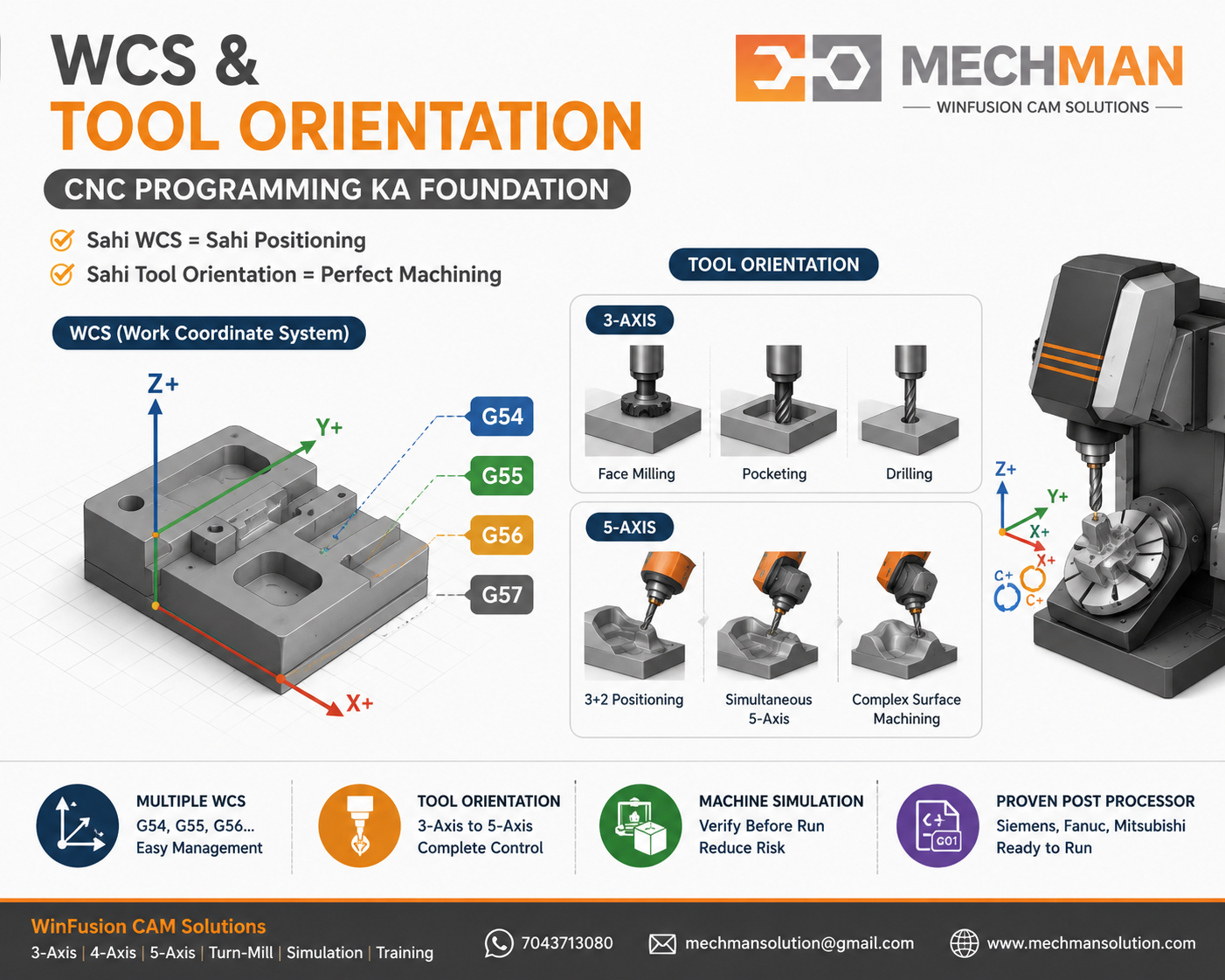
WCS aur Tool Orientation — ye simple lagte hain, lekin galat set hone par perfectly generated toolpath bhi wrong direction, wrong position ya collision create kar sakta hai! WinFusion isi foundation ko correctly set karta hai!
CNC programming mein WCS (Work Coordinate System) aur Tool Orientation do aise concepts hain jo simple lagte hain — lekin agar ye galat set ho gaye to best toolpath bhi wrong direction, wrong position ya machine collision create kar sakta hai!
WinFusion workflow mein proper WCS aur Tool Orientation setup especially 3-Axis, 4-Axis, 5-Axis aur Turn-Mill machining ke liye bahut important hai! Yahi complete CNC program ka real foundation hai!
Simple Rule: WCS = Machine ko batao part kahan hai. Tool Orientation = Machine ko batao tool kis direction se machining karega! ✅
🧭 WCS Kya Hota Hai?
Work Coordinate System = CAM aur Machine ko batata hai Part ka Zero Point kahan hai aur X/Y/Z directions kya hain!
X
Left ↔ Right
Machining width direction
Y
Front ↕ Back
Machining depth direction
Z
Bottom ⬆ Top
Tool approach direction ⭐
📌 Practical Example — Rectangular Block:
CAM Setup Mein:
- X: Left to Right
- Y: Front to Back
- Z: Bottom to Top
- Zero: Top left corner ⭐
Machine Par:
- Operator touch-off karega
- Same corner reference ⭐
- G54 mein save karega
- Program wahi zero use karta hai ✅
CAM WCS = Machine G54/G55/G56 — DONO SAME HONA CHAHIYE! Agar mismatch hoga to program correct hone ke baad bhi machining wrong location par hogi! ✅
⚠️ Wrong WCS Se Kya Problem Ho Sakti Hai?
Dangerous!
❌Tool wrong direction mein move
❌Component opposite side machine
❌Z direction reverse ho sakti hai
❌Machine alarm aa sakta hai
❌Tool/fixture collision possible
❌5-Axis rotation incorrect output
WCS sirf ek setup option nahi — ye complete CNC program ka foundation hai! ✅
🔩 Tool Orientation Kya Hai?
Tool Orientation = Machining ke time cutting tool kis direction mein point karega!
3-Axis Mein — Fixed!
Spindle direction fixed hoti hai — tool always Z-axis direction follow karta hai.
✓Face Milling, Pocket, Drill
✓Tool perpendicular to top surface
5-Axis Mein — Dynamic! ⭐
Tool aur component ka relative angle continuously change ho sakta hai!
⭐Lead/Lag angle define karo
⭐Side tilt for clearance
⚙️ Alag Machines Mein WCS & Orientation
Setup simple — lekin WCS still important!
- X/Y/Z travel limits verify
- Program zero: corner/center/top
- G54 me touch-off karo ⭐
- CAM aur machine same zero ✅
3-Axis mein wrong WCS = wrong location machining! ⚠️
Component angle par position → 3-Axis machining karo!
Example:
Side face ka pocket → Tool Orientation: Side face select → CAM toolpath generate → Post: rotary position output ⭐
Manual coordinate calculate karne ki zarurat nahi! ✅
4A
4-Axis — Rotary Positions
4 sides machine karna hai:
Proven post → rotary positions auto NC code! ✅
5A
5-Axis — Most Critical! ⭐
Advanced!
Tool + component angle continuously change!
Head-Head
Head-Table ⭐
Table-Table
Machine config + WCS + Orientation + Post — sab match karna zaroori! ✅
📍 Setup Origin — 5 Common Options
Program Zero kahan rakhe — Machine Setup ke according decide karo!
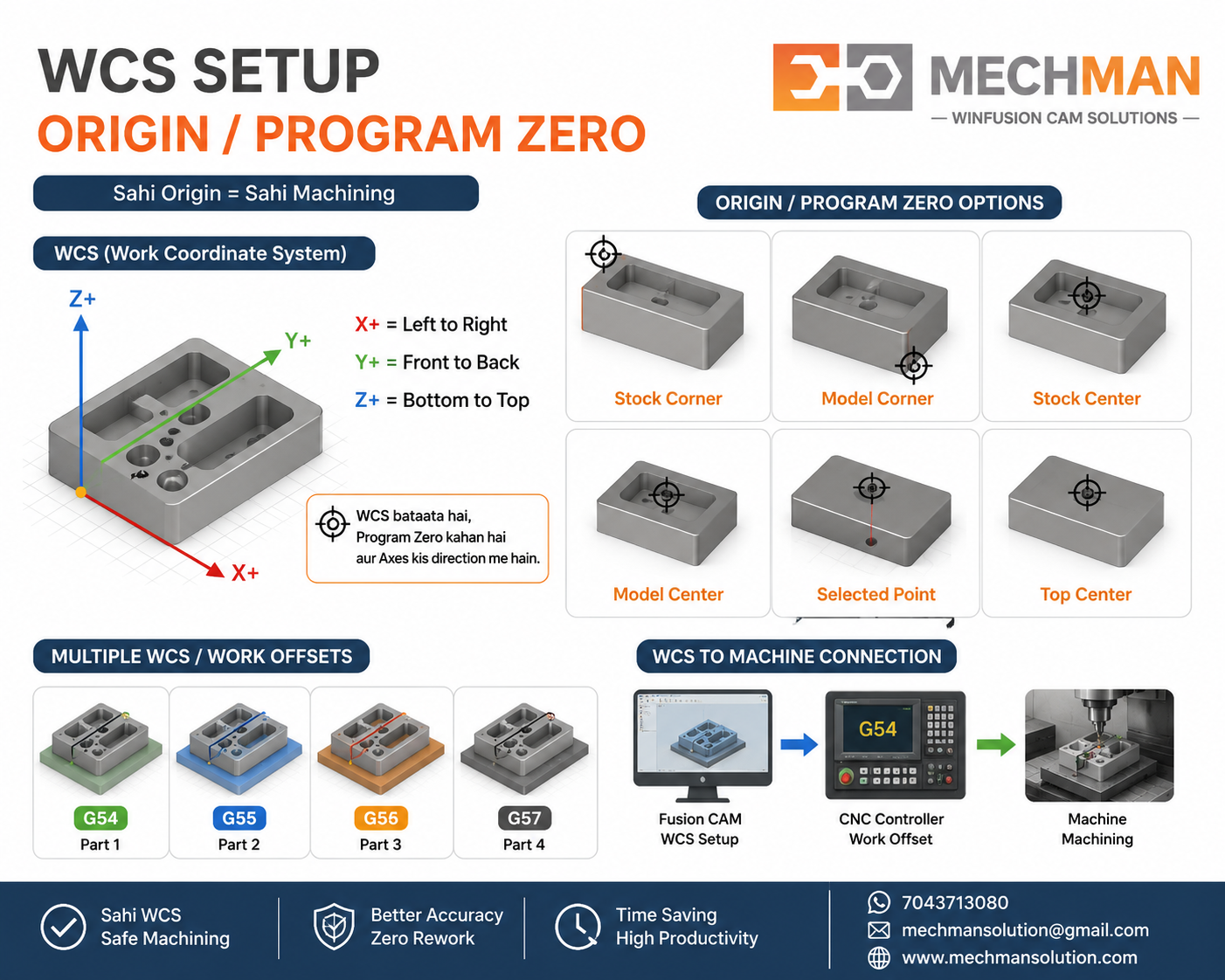
Setup origin selection — Stock corner, Model centre, Top face — operator ke setup ke according CAM mein wahi zero set karo. CAM aur machine ka zero mismatch = wrong machining location!
1
Stock Corner ⭐
Most common — easy to set on machine
2
Model Corner
Finished part reference se zero
3
Stock Centre
Symmetric parts ke liye useful
4
Model Centre ⭐
Die-mould complex components
5
Selected Point ⭐
Custom fixture / datum reference
🔑
Operator ke setup ke according decide karo — always same logic! ✅
🔢
Multiple WCS — Ek Table Par Multiple Parts! ⭐
Jab ek table par multiple parts ya fixtures ho — different WCS use karo!
Multiple Vice ✅
Tombstone Machining ⭐
Different Fixtures ✅
Batch Production ⭐
Correct CAM setup = multiple work offsets properly manage ho sakte hain! WinFusion isi mein help karta hai! ✅
🎮 WCS + Simulation + Post Processor — Complete Chain!
Sirf toolpath dekhna enough nahi — especially 4-Axis aur 5-Axis mein complete machine movement verify karo!
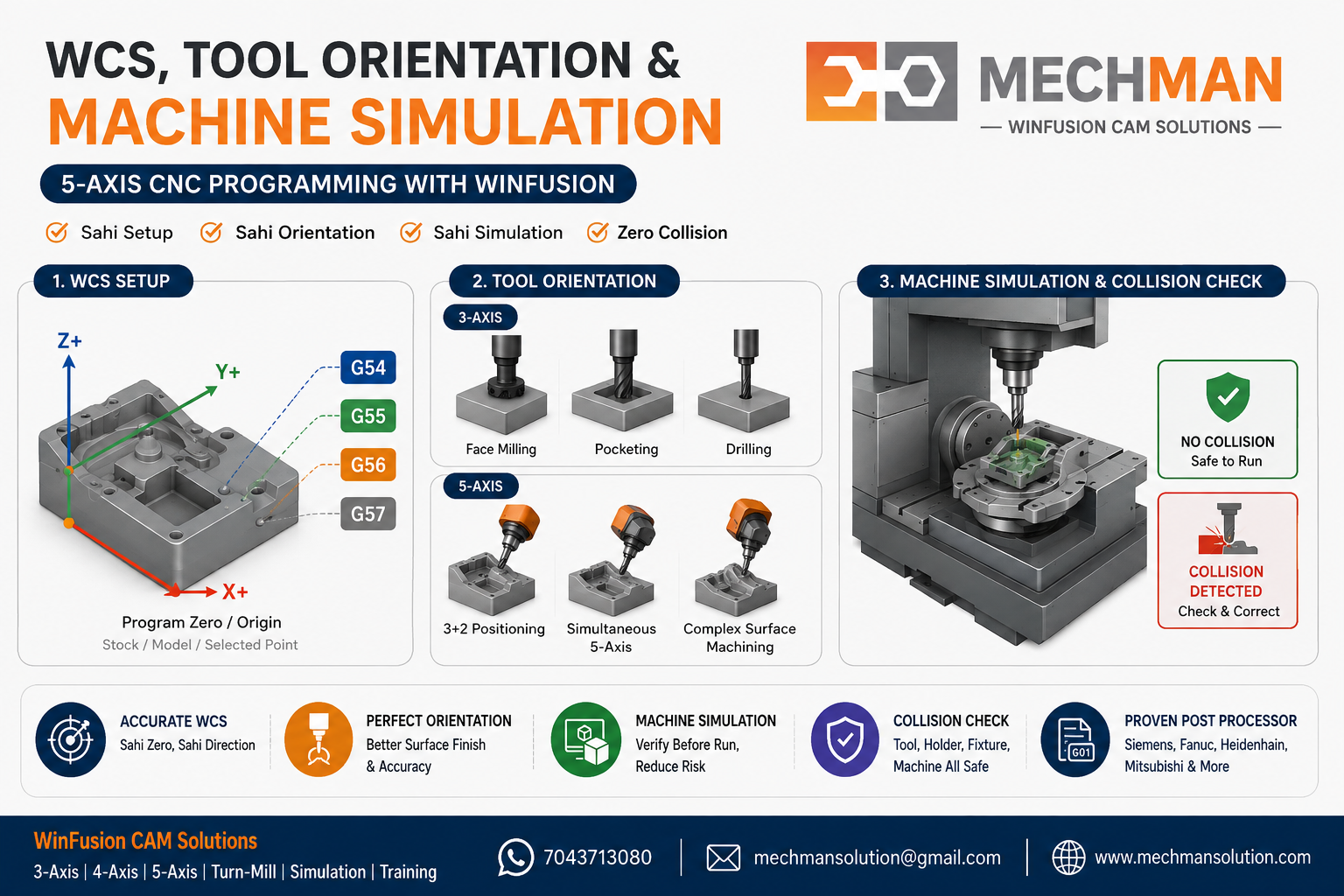
Machine simulation mein verify karo — rotary axis movement, tool orientation, fixture clearance, holder, machine limits — sab. WinFusion ka objective: NC program bhejne se pehle maximum issues digitally verify karna!
✓Rotary axis movement verify
✓Tool orientation check
✓Holder clearance verify ⭐
✓Fixture interference check
✓Machine limits check
⭐Prove-out risk reduce!
🔌 Post Processor Ka Role — WCS ke saath:
WinFusion Toolpath
→
Post Processor ⭐
→
NC Code (Axis moves)
→
CNC Machine ✅
Post processor: Rotary axis direction, RTCP, TCP, work plane commands, safe retract — sab define hota hai!
WinFusion — Complete CAM Workflow 🚀
CAD Model se CNC Machine tak — Complete Professional Workflow:
1
CAD Model — 3D geometry ready
2
Stock Setup — Raw material define
3
WCS / Setup Orientation ⭐ — Foundation!
4
Tool Library — Correct cutting tools
5
Tool Orientation ⭐ — Direction define!
6
CAM Toolpath — Roughing + Finishing
7
Machine Simulation — Verify before run
✅
Proven Post → NC Code → CNC Machine → Production! 🚀
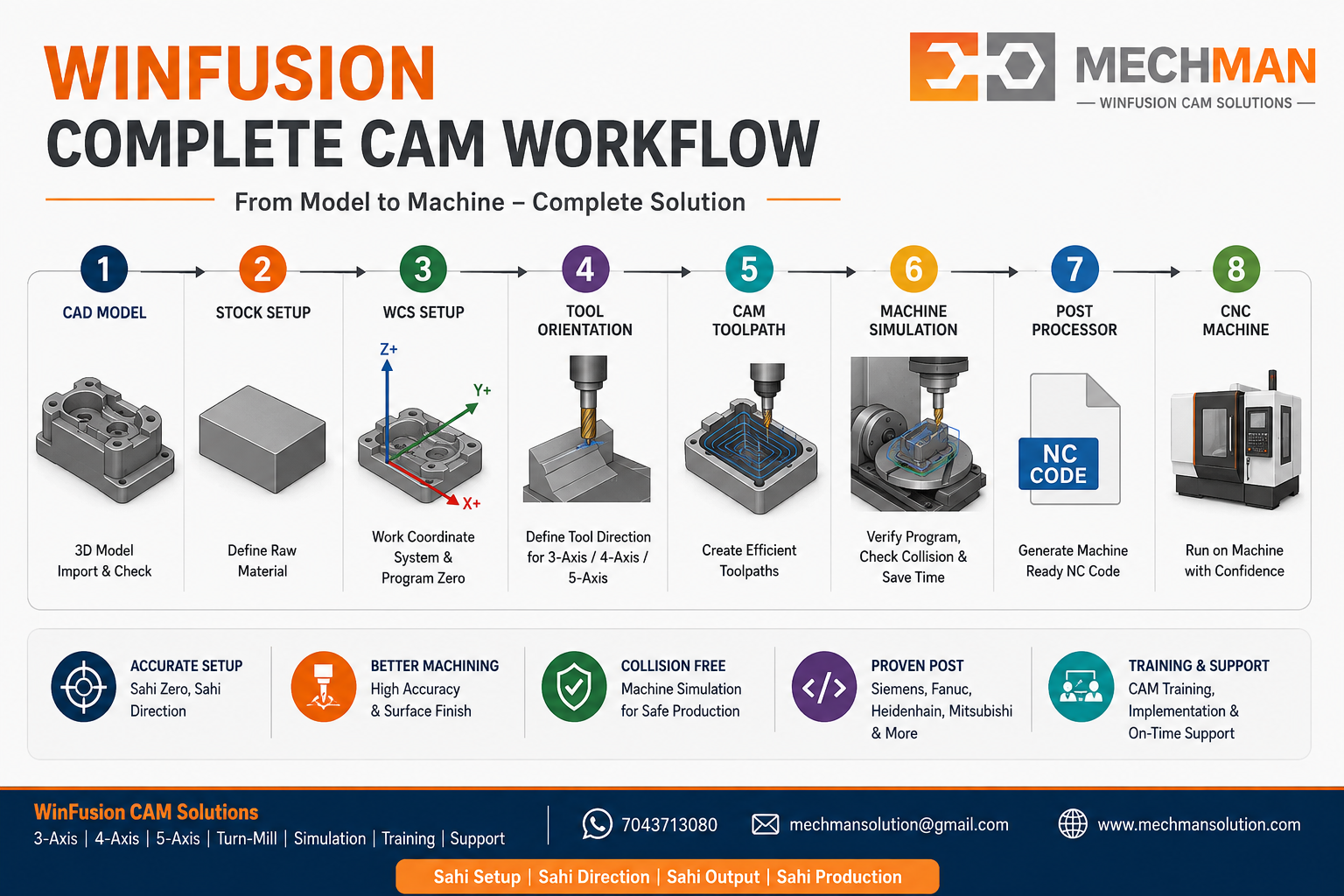
WinFusion: Complete CAM implementation — software se machine tak. WCS → Tool Orientation → Simulation → Post = Production-ready workflow!
Final Summary — 3 Critical Things! 🧭
🧭
WCS
Machine ko batata hai part kahan hai! ✅
🔩
Tool Orientation
Tool kis direction machining karega! ✅
⚙️
Post Processor
Axes ko kaise move karna hai! ⭐
3-Axis mein simple — 4-Axis, 5-Axis, Turn-Mill mein CRITICAL!
WinFusion isi complete workflow ko correctly implement karta hai. Software se Machine Tak! 🚀
🧭
WCS | Tool Orientation | Post Processor | Machine Simulation
Mechman Solutions — WinFusion
Autodesk Authorized Partner | Vadodara, Gujarat | Since 2015
www.mechmansolution.com
© 2025 Mechman Solutions | WinFusion — WCS & Tool Orientation Guide | Vadodara, Gujarat
