🔧 CAM Tool Library Guide — WinFusion 2025
Tool Library Creation —
Professional CAM Ka Hidden Secret! 🔧
Standardized Cutting Data | Correct Holder Setup | Reusable Library | Faster Programming
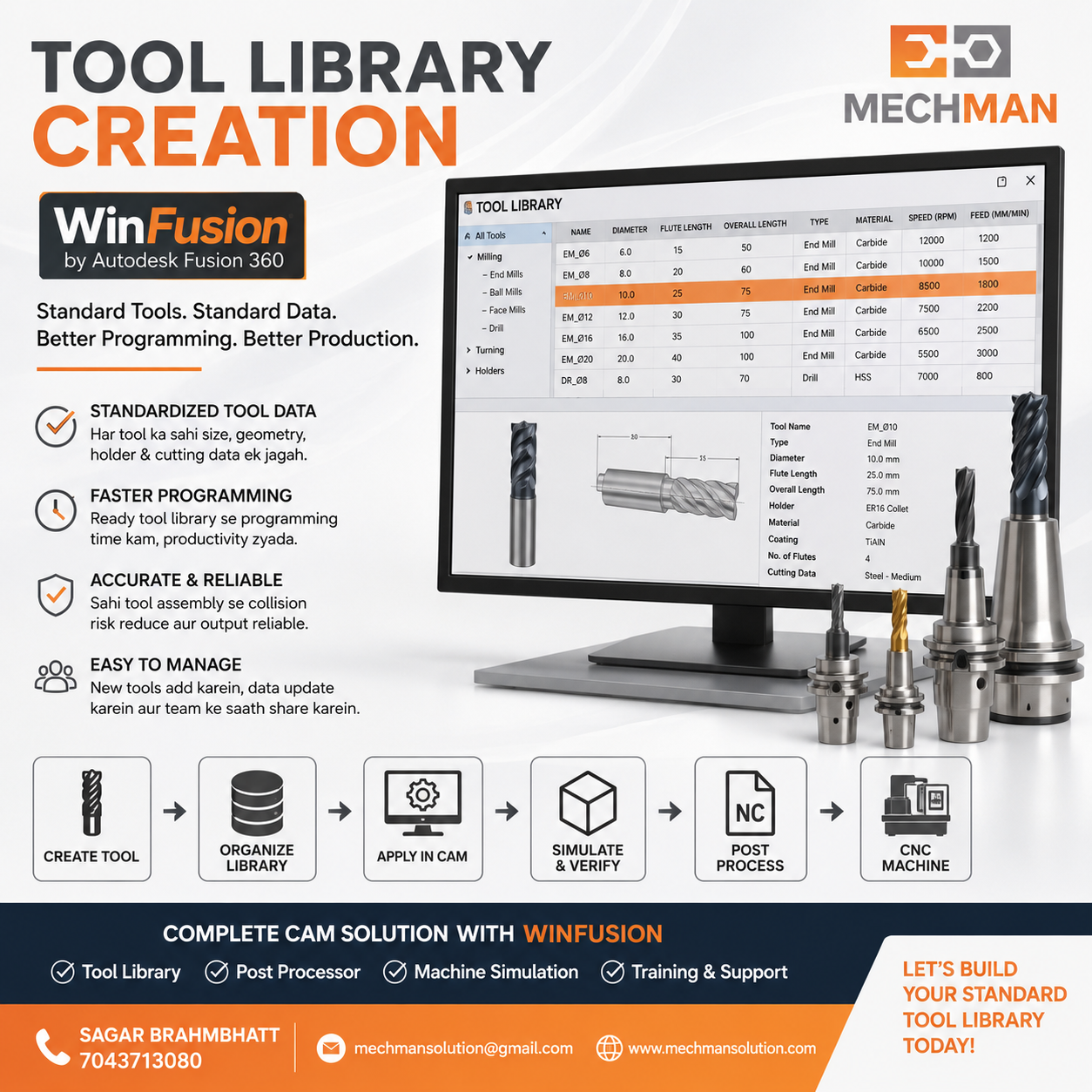
WinFusion Tool Library — Har tool ka proper definition: geometry, cutting data, holder, stick-out. Ek baar setup karo, baar baar use karo. Professional CNC programming ka sabse important foundation!
Fusion CAM sikhne ke baad bahut programmers toolpath create karna seekh lete hain — lekin ek aisi cheez hoti hai jo unhe proper CNC programmer se alag karti hai: Tool Library!
Har job ke liye manually tool data enter karna = time waste + inconsistency + human error ka risk! Professionally setup Tool Library = programming fast + consistent + production-ready!
WinFusion training mein Tool Library setup ek core module hai — kyunki yahi professional CNC programming ka real base hai!
❓ Tool Library Kyon Zaroori Hai?
Bina Tool Library Ke — Kya Hota Hai?
❌ Manual Tool Entry Har Job:
- Tool diameter, flutes manually enter
- Feed rate, RPM calculate har baar
- Holder length guess karna
- Same tool different parameters
- Programming slow + inconsistent ⚠️
✅ Tool Library Se:
- Once define → always reuse ⭐
- Standardized cutting params
- Correct holder configured
- All jobs consistent quality
- Programming 50%+ faster! ✅
Tool Library = One Time Setup → Lifetime Benefit! Professional CAM ka core foundation. ✅
📦 Tool Library Mein Kya Hona Chahiye?
Complete Tool Definition = Geometry + Cutting Data + Holder + Stick-Out
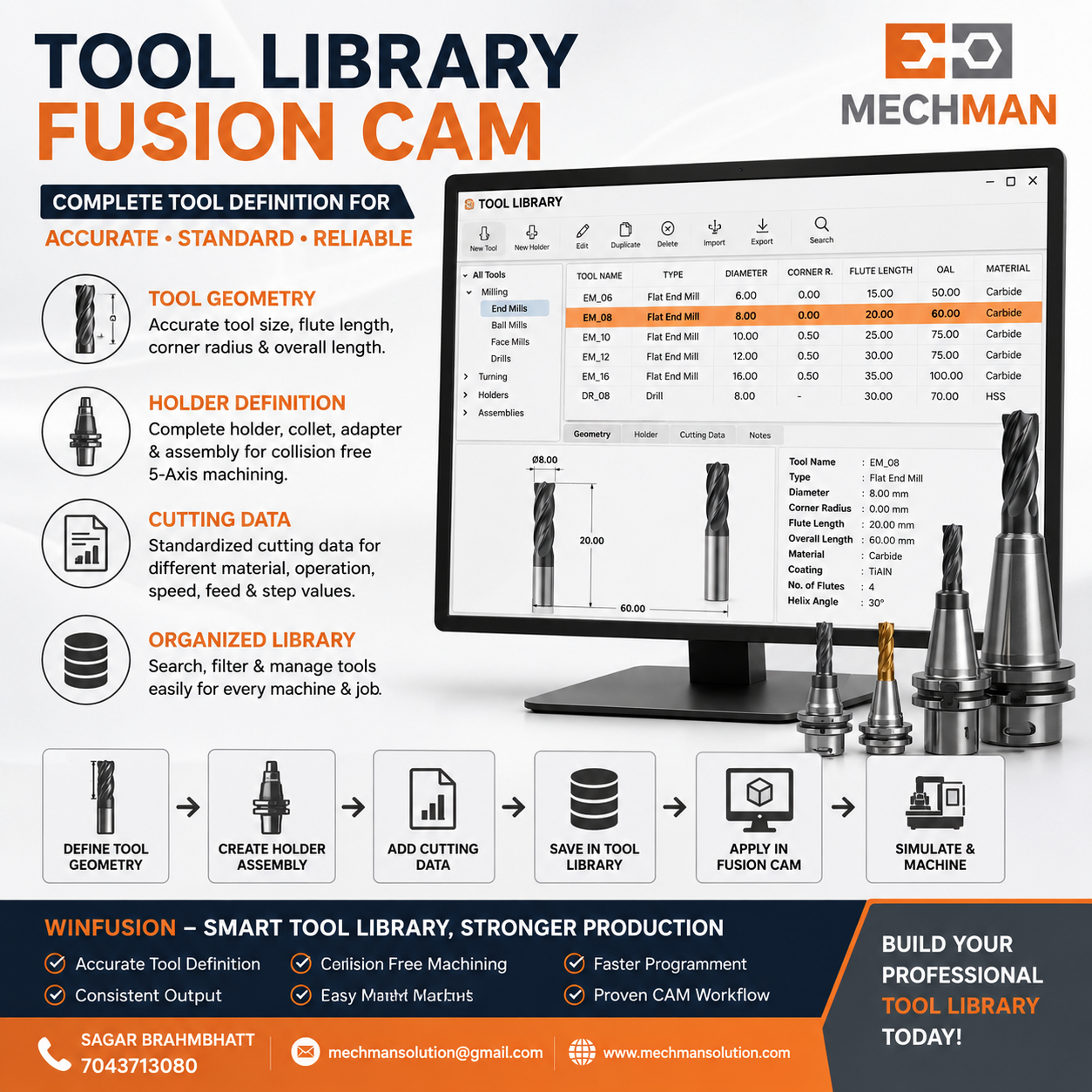
Fusion Tool Library — Har tool ke liye 4 key parameters properly define karna zaroori hai. Incomplete definition = wrong toolpath ya machine collision risk!
1️⃣ Tool Geometry — Shape Define
Diameter (D)e.g. 10mm
Overall Length (OAL)e.g. 75mm
Flute Count4 Flute
Corner Radius / Type ⭐Critical!
2️⃣ Cutting Data — Speed + Feed
Spindle Speed (RPM)e.g. 8000
Cutting Feed Ratee.g. 800 mm/min
Lead-In/Lead-Out Feede.g. 400 mm/min
Ramp Feed Rate ⭐Important!
Holder define karna kyun zaroori?
- Holder = Tool ka real extension
- Simulation mein holder collision check ⭐
- Collision risk virtually eliminate
- 5-Axis mein especially critical!
Holder missing = simulation incomplete ⚠️
Stick-out = Tool holder se kitna bahaar hai — directly rigidity affect karta hai!
- Deep pockets mein long stick-out
- Surface finish affect karta hai
- Chatter risk increase
- Minimum use karo ⭐
Minimum stick-out = Better finish + Less vibration ✅
🔧 WinFusion Tool Library — Kaunse Tools Cover Karte Hain?
Complete Tool Library — Milling, Turning, Turn-Mill, Probing — sab covered!
⚒️ Milling Tools:
🔩
Flat End Mill
2D + Adaptive
⚫
Ball Nose ⭐
3D finishing
🔷
Bull Nose
Corner radius
📐
Chamfer Mill
Edge break
🔄 Turning Tools:
Turn-Mill machines ke liye: Milling + Turning tools dono same library mein organized! ✅
📋 Tool Library Banana — Step by Step
WinFusion Mein Tool Library Setup — Actual Process:
1
Tool Type Select Karo
End Mill, Ball Nose, Drill, Turning Insert — correct type = correct toolpath generation
2
Geometry Define Karo
Diameter, OAL, Flute Count, Corner Radius — actual tool ka measurement enter karo, approximate nahi!
3
Cutting Parameters Enter Karo ⭐
RPM, Feed Rate, Ramp Feed, Lead-In/Out — material aur tool manufacturer recommendation ke according set karo!
4
Holder Configure Karo ⭐
Holder type, diameter, length — especially 5-Axis, Turn-Mill mein holder simulation ke liye absolutely essential!
5
Stick-Out Length Set Karo
Minimum required stick-out define karo — rigidity aur finish directly related hai!
6
Tool Number + Name Convention
Consistent naming: T01-D10-EM-4F ya T01-Ø10-END-4FL — operator ko setup sheet se machine par load karna easy ho!
✅
Save → Cloud Library mein! ⭐
Fusion mein Cloud Tool Library save karo — team ke sab programmers access kar sakein!
🧲 Material-Specific Cutting Data — Tool Library Ka Asli Power!
Ek hi tool ko alag materials mein alag parameters se use karte hain — Tool Library mein ye organize karo!
| Tool |
Aluminium |
Mild Steel |
Stainless Steel |
| Ø10 End Mill 4F |
High RPM+Feed ⭐ |
Medium |
Low RPM+Feed |
| Ø10 Ball Nose 2F |
Fast finishing ⭐ |
Medium |
Conservative |
| Tip: Library mein material-wise organize karo! |
AL-prefix |
ST-prefix |
SS-prefix ⭐ |
WinFusion training mein material-specific cutting data properly define karna — tool manufacturer recommendations + actual shop experience combine karte hain! ✅
🎮 Tool Library + Machine Simulation — Complete Safety Net!
Complete Tool + Holder define karo → Machine Simulation mein fully verify!
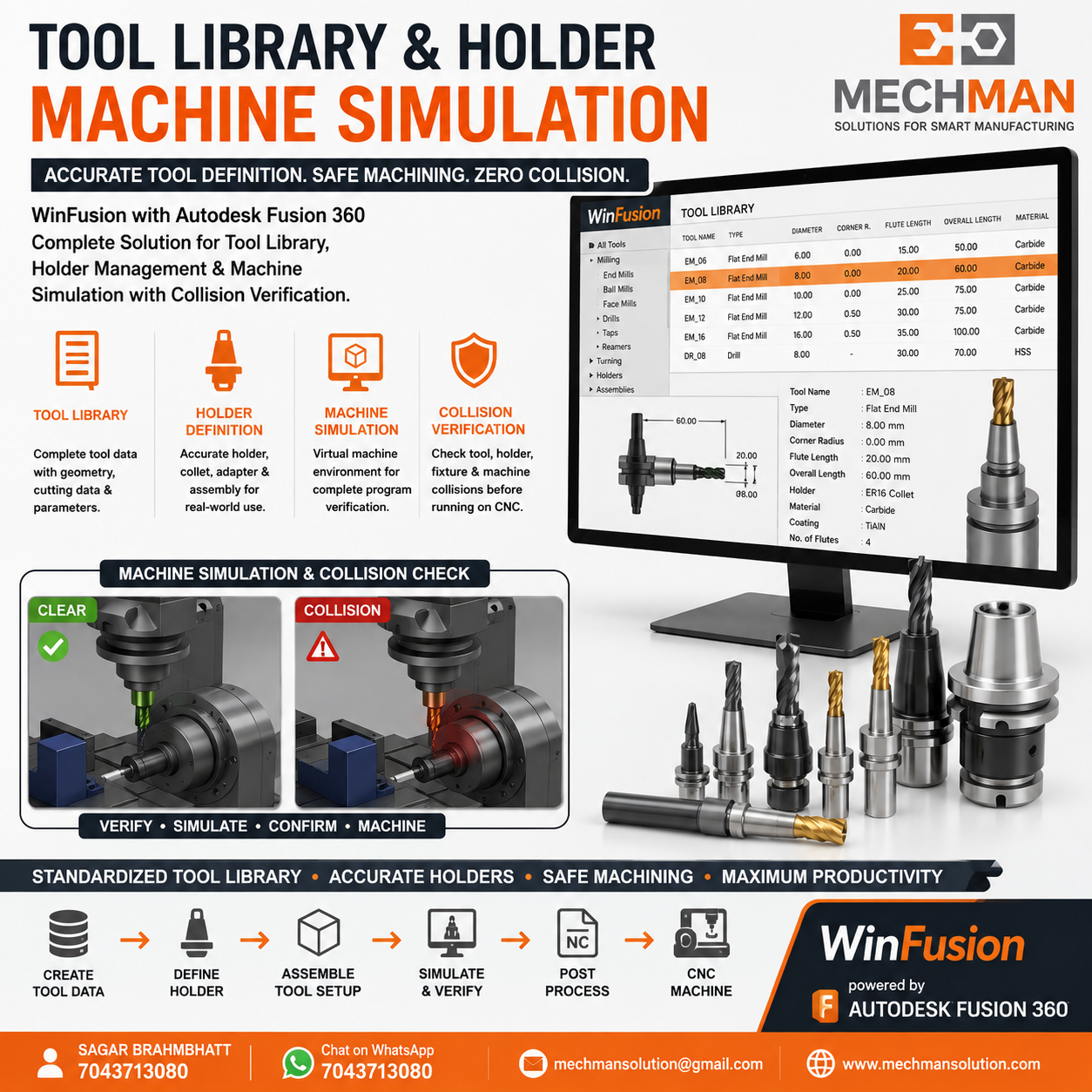
Properly defined tool + holder → Machine simulation mein collision virtually check → Real machine par confident production. Tool Library setup ka yahi sabse bada benefit hai!
✅Holder-component collision check
✅Stick-out adequacy verify
✅Fixture interference avoid
⭐Production confident!
✅ Professional Tool Library Ke 8 Benefits
✅Programming time reduce ⭐
✅Consistent cutting quality
✅Human error reduced
✅Simulation realistic ⭐
✅Tool life predictable
✅Team-wide standardization
✅Setup sheet auto-generate
🔧Professional CNC Programming!
WinFusion — Complete Tool Library Implementation 🚀
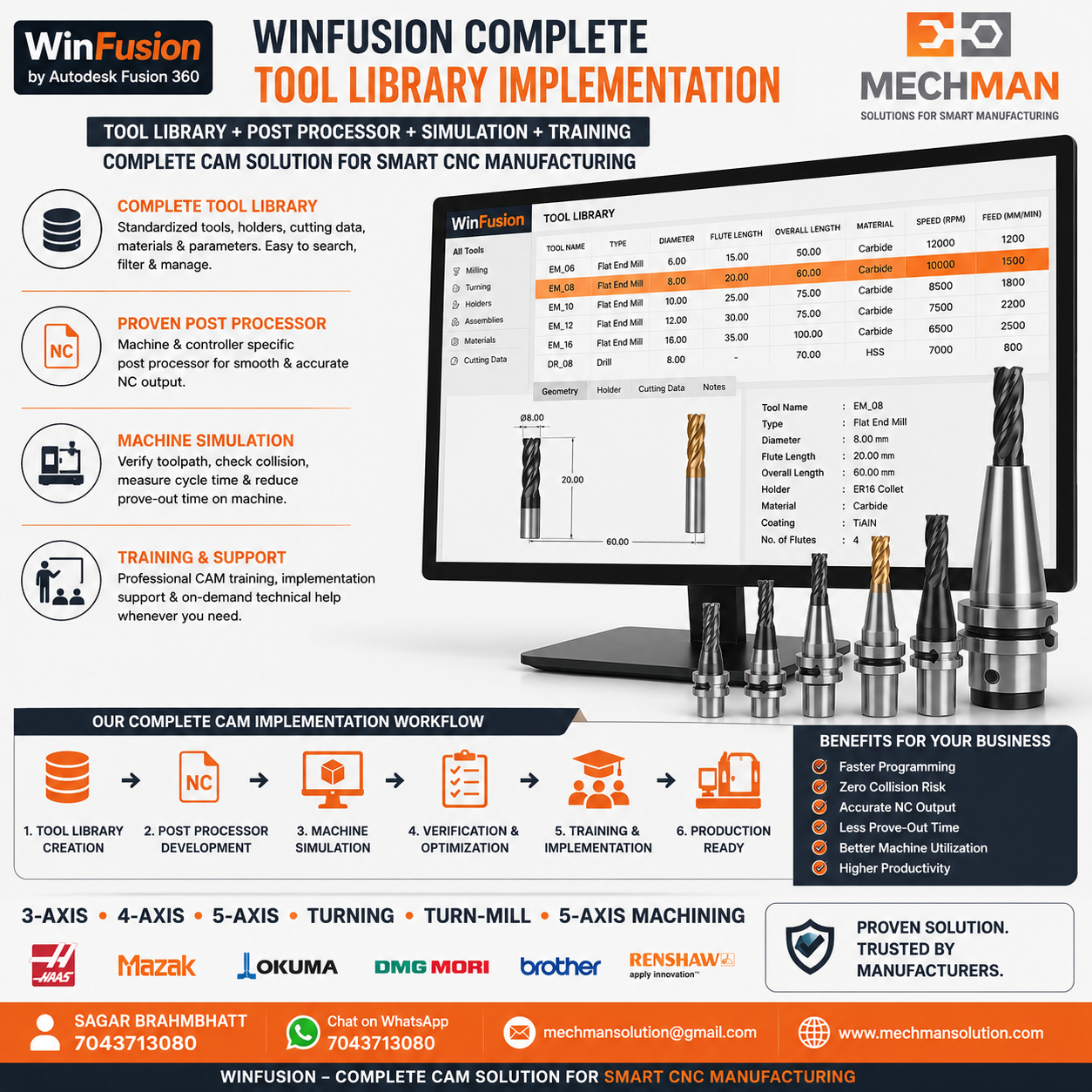
WinFusion mein Tool Library sikhte nahi — real shop ke tools ke saath actual library build karte hain. Post Processor + Simulation mein ye library directly use hoti hai!
Final Thought 🔧
Tool Library sirf ek CAM feature nahi — ye professional CNC programming ka foundation hai! Jo programmer Tool Library properly setup karta hai, woh:
Simulation Better
Realistic ✅
Quality Consistent
Always ✅
WinFusion mein real shop ke tools ke saath actual Tool Library build karo! Post Processor + Machine Simulation ke saath production-ready CNC programming sikho! 🔧🚀
🔧
Tool Library | Post Processor | Machine Simulation | Training
Mechman Solutions — WinFusion
Autodesk Authorized Partner | Vadodara, Gujarat | Since 2015
www.mechmansolution.com
© 2025 Mechman Solutions | WinFusion — Tool Library Creation Guide | Vadodara, Gujarat
